A legal document workflow is the step-by-step process that legal teams follow to manage documents. Whether it’s a standard NDA or a complex commercial agreement, these workflows involve multiple stakeholders, rounds of review, and strict compliance requirements.
But for many in-house legal teams, these steps are still handled manually via email, Word docs, and shared drives. This leads to version control issues, delays in getting approvals or signatures, and an overall lack of visibility into where things stand.
So, let’s explore how automating the legal document workflow helps legal teams work faster, reduce risk, and free up time for more strategic matters.
Challenges of Manual Document Handling
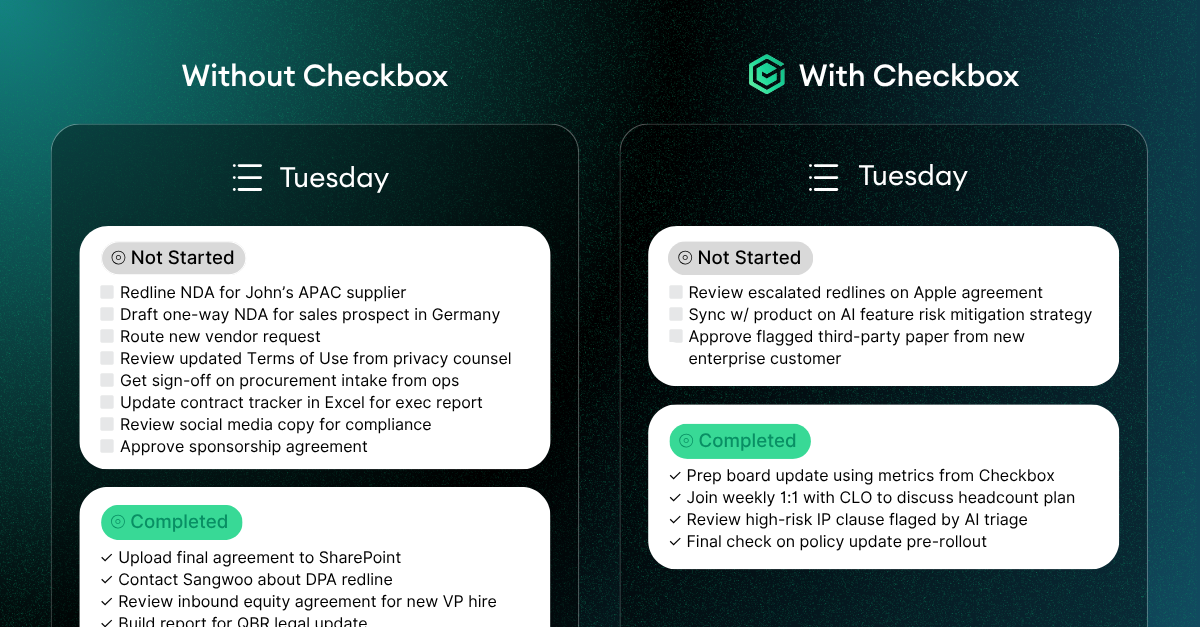
Manual document workflows slow legal teams down and the impact adds up quickly. When a business user needs a contract, they often email legal directly with little context or incomplete information. Legal then spends time chasing down missing details before even getting started.
Once a draft is ready, reviews and approvals often happen via back-and-forth emails or shared drives, making it hard to track versions or see who’s approved what. Signatures are delayed by printing, scanning, or juggling multiple e-signature platforms without clear visibility.
This fragmented process not only wastes time, but it introduces risk. Incorrect versions might get signed, key clauses can be missed, and without a central system, it’s difficult to audit who did what, when.
This can ultimately lead to lower turnaround times, inconsistent documents, and a legal team buried in admin instead of focusing on higher-value work.
How to Automate Document Creation and Review
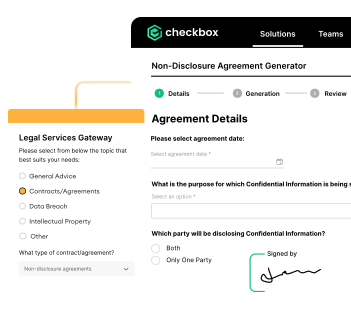
Automating the creation and review of legal documents helps eliminate repetitive work and ensures consistency from the start. Instead of drafting contracts manually each time, legal teams can use pre-approved templates that generate documents based on structured inputs like contract type, jurisdiction, or deal value.
With legal workflow automation software like Checkbox, business users can self-serve by answering a few guided questions. The system then generates the appropriate document (i.e. mutual NDA, a vendor agreement, or a services contract) using pre-set logic and legal-approved language.
For reviews, automated workflows ensure the right people are looped in based on contract type or risk level. Low-risk documents can be approved automatically or routed directly for signing, while high-value or redlined contracts trigger legal review.
This not only speeds up turnaround but also gives legal teams confidence that no steps or clauses are missed along the way.
Managing Approvals and Signatures
Getting contracts approved and signed is often where momentum stalls (especially when the process relies on email threads, manual reminders, or unclear responsibilities). Automating this stage of the legal document workflow brings structure and speed.
With a platform like Checkbox, approval workflows are built in. You can configure logic for sequential or parallel approvals, set thresholds (e.g. Legal review only if contract value exceeds $100K), and automatically route documents to the right stakeholders.
Once approved, contracts can be sent for signature using integrated e-signature tools like DocuSign or Adobe Sign. Signature tags are placed automatically, signing order is enforced, and status is tracked in real-time. That means no more chasing down signatories or wondering which version was signed.
Centralizing Document Storage and Access
Even after a contract is signed, the work isn’t done. Documents often get lost in email threads or saved to local drives, making it hard to track down the latest version or even confirm if a contract exists. Without centralized access, legal teams waste time searching, and the business lacks visibility into critical terms like renewal dates or obligations.
A centralized legal document workflow keeps everything in one place. Every document is automatically stored in the correct location, tagged by type, status, and metadata like contract value or expiry date.
Additionally, permissions ensure the right people can access what they need, while maintaining security and confidentiality. And because documents are tied to the full workflow history, legal teams can instantly see who approved what, when it was signed, and what next steps (like reminders or renewals) are coming up.
This kind of visibility is key for staying compliant, avoiding missed deadlines, and supporting better decision-making across the business.

Benefits of an End-to-End Document Workflow
When every step of the legal document workflow is connected, legal teams unlock efficiency and control.
Business users get faster turnaround on routine contracts, while legal focuses on high-value work. Templates and approval logic ensure consistency and compliance, reducing the risk of errors or rogue versions getting signed.
With real-time dashboards and audit trails, legal gains full visibility into what’s in progress, what’s blocked, and what’s coming up, whether that’s a renewal deadline or a signature still pending. This transparency also makes it easier to report on team performance and demonstrate legal’s impact to the business.
Key Takeaways
Legal document workflows span everything from the initial request to final signature and storage, but when handled manually, they’re slow, inconsistent, and prone to risk. By automating the creation, review, approval, and execution of legal documents, teams can:
- Eliminate bottlenecks,
- Ensure compliance, and
- Operate with far greater efficiency.
Centralizing the workflow also gives legal teams real-time visibility into progress and performance, empowering them to better support the business. With the right tools in place, legal can scale its impact without scaling headcount.
Ready to streamline your legal document workflow? Book a demo with Checkbox to see how end-to-end automation can transform the way your team works.