In-house legal workflow automation software helps legal teams manage the growing volume and complexity of legal requests across the business. From intake to approvals and reporting, it replaces manual emails, spreadsheets, and back-and-forth with a streamlined, centralized system tailored specifically for legal work.
Unlike generic task tools or IT ticketing systems, in-house legal workflow automation is purpose-built for legal teams, automating repetitive tasks, standardizing processes, and improving visibility without requiring legal to change how it works.
As demand on legal continues to rise, especially heading into 2026, these platforms are becoming essential for teams looking to operate with greater efficiency, consistency, and confidence.
The Role of Workflow Automation in Corporate Legal
In-house legal teams today sit at the intersection of the business. From marketing reviews and privacy assessments to procurement approvals and compliance workflows, the scope of legal work has expanded across nearly every business function.
Without structure, this volume creates chaos as requests arrive through scattered emails, status updates are hard to track, and legal risks missing crucial matters.
Corporate legal workflow automation offers a solution by automating the intake, triage, and routing of legal work. This ensures teams stay on top of all incoming legal requests, the right people are looped in at the right time, and repetitive tasks are handled without manual effort.
Ultimately, workflow automation aims to help legal transition from a reactive function to a proactive business partner, freeing up time for strategic work and enabling faster, more compliant decision-making across the organization.
Key Features of In-House Legal Workflow Software
You’ve probably heard of Jira, Microsoft Power Automate, or Zapier, but these generic workflow tools aren’t built for legal. The best in-house legal workflow management software offers features tailored to how corporate legal teams actually work, balancing flexibility, control, and compliance. Key capabilities include:
AI-Powered Intake and Triage
Automatically capture legal requests via smart forms or natural language input through an AI legal chatbot, then classify and route them to the right person or workflow.

No-Code Workflow Builder
Build and customize complex approval paths, conditional logic, and multi-step processes with a no-code workflow automation tool. With a drag-and-drop interface, legal won’t need to rely on IT for impactful, quick changes.

Self-Service Tools
Empower business users to handle routine or repetitive legal tasks like NDAs, marketing reviews, or policy queries through guided, automated workflows and user-friendly document generation apps.

Real-Time Dashboards and Reporting
Track legal metrics such as workload, turnaround times, and request volumes across the team. Generate audit-ready records with modular legal software that connect workflow automation with matter management and reporting and demonstrate legal’s value to the business.

Integration with Business Systems
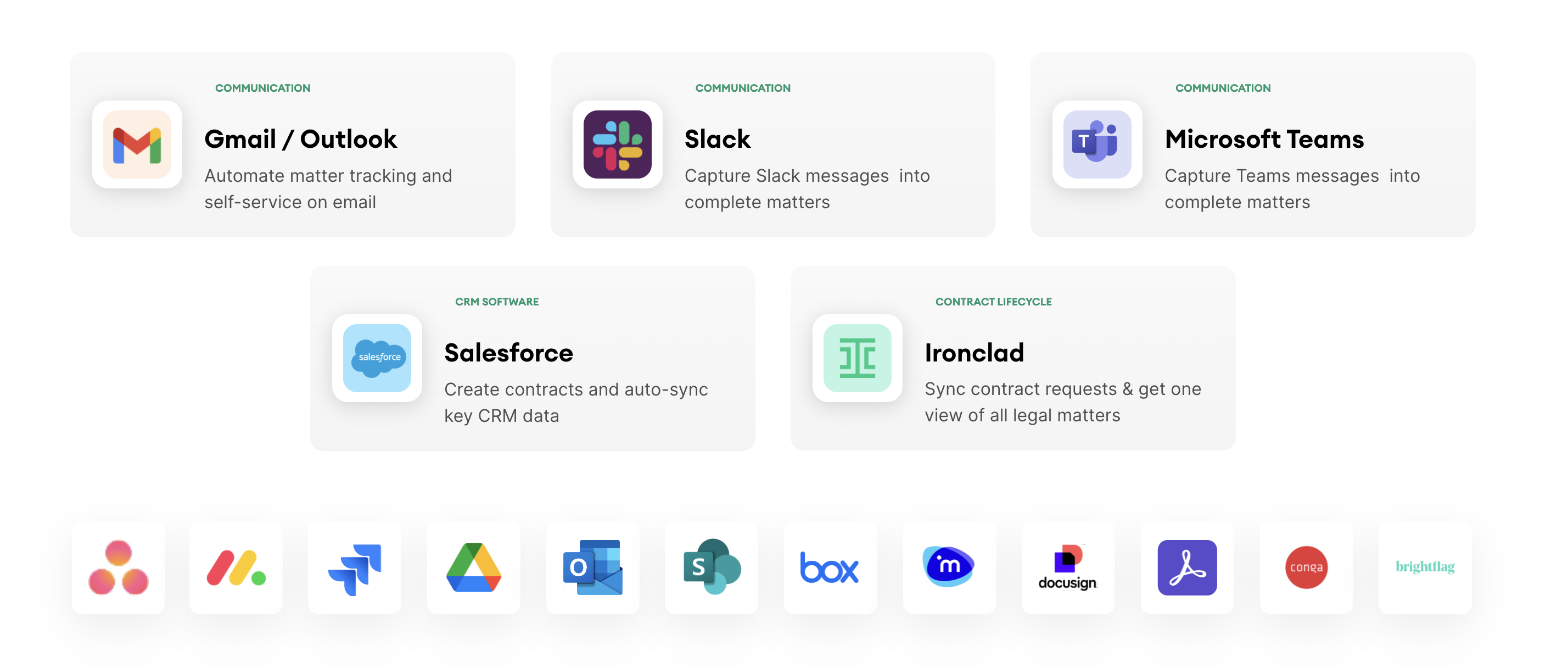
Seamlessly connect tools like CLMs, e-signature platforms (DocuSign, Adobe Sign), and eBilling software together for end-to-end process automation.
Core Use Cases for Legal Teams
The value of in-house legal workflow automation lies in its versatility. Legal teams deal with a wide range of request types, some routine, some high-risk, and the right software should support all of them. Common use cases include:
- NDA Automation → Allow business users to self-serve NDAs through a guided workflow, with built-in logic for template selection, approval triggers, and e-signature. Legal only steps in when needed.
- Contract Review Triage → Intake contract requests with structured fields to assess value, risk, and type. Then, automatically route to legal (or fast-track if low-risk) based on predefined thresholds.
- Conflicts of Interest (COI) Disclosures → Automate COI submissions and reviews, flag high-risk disclosures, and maintain an audit trail for compliance teams.
- Data Breach Assessments → Enable business users to log incidents quickly, assess severity through automated logic, and trigger legal involvement based on regulatory obligations.
- Outside Counsel Engagement → Standardize requests for external legal support, enforce vendor policies, and connect with eBilling tools like Brightflag for spend tracking and approvals.
- Procurement & Delegation of Authority (DoA) → Ensure approvals are aligned with company policy, route to the right stakeholders, and log decisions in a central matter management system.
Each of these use cases benefits from in-house legal workflow management software that reduces manual back-and-forth, improves consistency, and makes legal processes easier to follow for everyone involved.
Benefits of Streamlined Legal Operations
Implementing corporate legal workflow automation unlocks measurable improvements across efficiency, visibility, and strategic impact. The benefits extend beyond the legal team, affecting how the entire business engages with legal. Together, they position legal as a strategic enabler of speed, compliance, and value.
| Benefit | Description |
|---|---|
| Faster Turnaround Times | Requests are routed, triaged, and actioned without delay, reducing cycle times from days to hours for tasks like NDAs, contract reviews, or compliance approvals. |
| Reduced Manual Workload | Legal teams spend less time chasing emails, filling out forms, or manually tracking status. Automation handles the admin so lawyers can focus on high-value work. |
| Improved Compliance and Risk Management | Standardized workflows ensure that legal policies are followed every time. Audit trails, version control, and approval logic reduce the risk of errors or missed steps. |
| Scalable Legal Support Without Scaling Headcount | As the business grows, in-house legal workflow automation software enables legal to support more work without adding more lawyers, maximizing the team’s impact. |
Choosing the Right Software with Confidence
Selecting the right in-house legal workflow automation software is critical to long-term success. Legal teams need a platform purpose-built for legal work that support both contracting and non-contracting workflows, offer audit-ready approval paths, and handle sensitive data with confidence.
No-code functionality is another must-have, empowering legal ops or tech-savvy team members to build and update workflows independently without waiting on IT. Scalability is also key. As your business grows, your software should be able to handle higher request volumes, more complex approval paths, and expanding teams without slowing down.

Finally, don’t overlook integrations. The best in-house legal workflow management software connects seamlessly with your existing tools, including contract lifecycle management tools (CLMs) like Ironclad, eBilling platforms like Brightflag, and e-signature tools such as DocuSign or Adobe Sign.
Avoid solutions that rely heavily on technical configurations or can’t adapt beyond basic intake. With the right platform in place, your legal team can streamline operations, maintain control, and scale its impact with confidence.
Key Takeaways
The right in-house legal workflow automation software makes it possible to move faster, do more, and demonstrate value without burning out. By streamlining intake, automating processes, and centralizing legal work, legal teams can reduce manual overhead, improve compliance, and operate with clarity and control.
Checkbox is built specifically for legal teams and is designed to handle both complex and high-volume workflows with ease. Whether you’re automating NDAs, triaging contract reviews, or managing outside counsel requests, Checkbox gives you the tools to simplify operations and scale your legal function without adding headcount.
Ready to see it in action? Book a demo with Checkbox and discover how in-house legal workflow automation can transform the way your team works — confidently and efficiently.