Legal intake is the front door to the legal team, so if it’s broken, everything behind it suffers. A slow, manual, or inconsistent intake process introduces risk, delays work, overwhelms the team, and leaves stakeholders frustrated.
The most effective intake systems ensure requests always reach the right people, with the right context, automatically. They enable self-service for common needs, streamline collaboration for complex ones, and offer the visibility legal ops needs to manage resources and prove value.
Let’s break down what makes a legal intake system not just good, but great.
Top 6 Features of Effective Intake Tools
A legal intake tool is only as good as its ability to drive outcomes like speed, accuracy, visibility, and adoption. The best systems are designed with these goals in mind, and they embed the flexibility legal ops teams need to evolve processes over time without relying on IT. Here are the features that separate high-performing tools from the rest:
1. AI-Powered Triage and Smart Routing
Automated legal request triage ensures every request is categorized and routed based on pre-defined logic or AI analysis. This reduces manual review, eliminates inbox chaos, and gets work moving faster.

2. Self-Service Capability for Business Users
Tools that support guided self-service for things like NDA generation, COI disclosures, or contract risk assessments, help legal scale support without scaling headcount. Business users get what they need fast, and legal only gets involved when needed.

3. Centralized Intake Hub Across Channels
Whether requests come in via email, Slack, Teams, or intranet forms, everything flows into a single platform with structured workflows and full visibility for legal ops.

4. Workflow Automation with Governance
From multi-step approvals to conditional logic, robust tools automate not just intake, but the full lifecycle of the request. Built-in audit trails ensure defensibility and compliance without additional overhead.

5. Real-Time Dashboards and Reporting
An effective legal intake process has a flow-on effect on reporting and performance tracking. Real-time legal analytics dashboards provide insight into volume, trends, turnaround times, and bottlenecks, enabling legal to demonstrate value to the business.

6. Enterprise-Ready Security & Privacy
Built for legal-grade confidentiality, these tools should offer granular permissioning, encryption, and compliance with standards like SOC2 and ISO27001.

Most Effective Legal Intake Tools
With so many tools claiming to solve legal intake, it’s easy to get overwhelmed with choice. But when you dig deeper, most options fall short as they’re either too focused on contracts, too reliant on IT, or too limited in functionality. Here is a snapshot of how the leading tools stack up when it comes to legal intake and workflow automation:
| Tool | Best For | Limitations |
|---|---|---|
| Checkbox | Full-spectrum legal intake, triage, workflow automation, and reporting | Not a CLM or document repository; designed to complement, not replace those systems |
| Josef | Simple, form-based legal intake for low-complexity use cases | Limited workflow logic, escalation handling, and integrations for complex processes |
| Power Automate | IT-led workflow automation in Microsoft environments | Requires scripting knowledge; short process timeouts; not legal-specific |
| Ironclad | Contract intake for teams already using Ironclad as a CLM | Limited to contract workflows; doesn’t handle general legal, compliance, or advice intake |
Checkbox stands out for in-house legal teams looking to scale operations across all legal work, not just contracts. It offers the breadth of intake coverage and depth of automation required by modern corporate teams, without needing technical resources to build or maintain it.
Most Efficient Processes & Automation Use Cases
Efficiency gains of proper legal intake come from automating triage, approvals, escalations, and even resolution. Here are the most impactful automation use cases legal teams are deploying today to reduce manual effort, improve accuracy, and speed up service delivery:
Self-Service NDAs
For many legal departments, NDAs are one of the most repetitive, low-risk legal requests dealt with on a weekly basis. With a legal intake software like Checkbox, business users can generate jurisdiction-specific NDAs by answering a few guided questions via an automated self-service portal. Legal is only looped in when thresholds are exceeded or redlines are proposed.
Contract Materiality Assessment
Legal intake systems can automatically screen contracts based on pre-defined rules such as value, type, or risk indicators to determine whether legal review is required. This helps contribute to faster turnaround, fewer bottlenecks, and more consistent application of review thresholds across the business.
Outside Counsel Requests & Spend Approval
Standardized workflows brought to life through a legal intake tool for new external counsel requests ensure the right information is collected upfront and routed for budget and vendor approval before hitting e-billing systems like Brightflag. This helps eliminate unapproved spend and ensures compliance with outside counsel policies.
Compliance Workflows (e.g. COI, Privacy Incidents)
Automated forms, AI intake assistants, and decision logic allow employees to disclose conflicts or assess data breach severity. High-risk matters are escalated, while low-risk ones are auto-resolved with documentation. This results in faster compliance, reduced risk exposure, and clear audit trails.
Marketing & Product Review Approvals
Time-sensitive reviews, such as ad copy or feature rollouts, often suffer from unclear handoffs and missed deadlines. Automated legal intake workflows gather all required info, route to the right legal owner, and track status. This helps reduce any back-and-forth communication between stakeholders and better alignment between legal and business teams.
How to Measure Effectiveness (Speed, Accuracy, Adoption)
Implementing legal intake tools and automation is only part of the equation. To ensure the system is delivering real value (and to build the case for further investment) you need to track performance across the right dimensions. Here’s how leading legal ops teams measure the effectiveness of their intake and workflow systems:
Speed: How Fast Are Requests Handled?
Cycle time is one of the clearest indicators of efficiency. With a well-designed system, you should see measurable reductions in time to triage, approve, and close requests. For example, as a benchmark, Checkbox customers average only 3-5 days to complete a matter, with NDAs processed in under 1 hour.
Accuracy: Are Requests Going to the Right Place?
A strong intake system reduces errors by eliminating room for incomplete forms, misrouted requests, or manual follow-ups to clarify scope. Indicators to track include:
- % of requests resolved without escalation
- Reduction in “back-and-forth” emails
- Number of matters auto-routed or triaged without human input
Adoption: Are People Actually Using It?
Even the most sophisticated system won’t drive value if business users don’t use it (or if legal reverts back to using that shared inbox). Here is what to measure to get a sense of adoption:
- Number of requests submitted via the intake platform
- % of legal work managed through structured workflows
- Self-service usage (e.g. NDA automation volume)
Key Takeaways
Efficiency in legal intake is mainly about reducing manual effort, minimizing risk, and freeing up the legal team to focus on more strategic, high-impact work. The most effective systems are purpose-built for legal, not repurposed from IT or contract management. They combine intelligent triage, workflow automation, and real-time visibility into one platform, making it easier for legal ops to manage demand and scale operations.
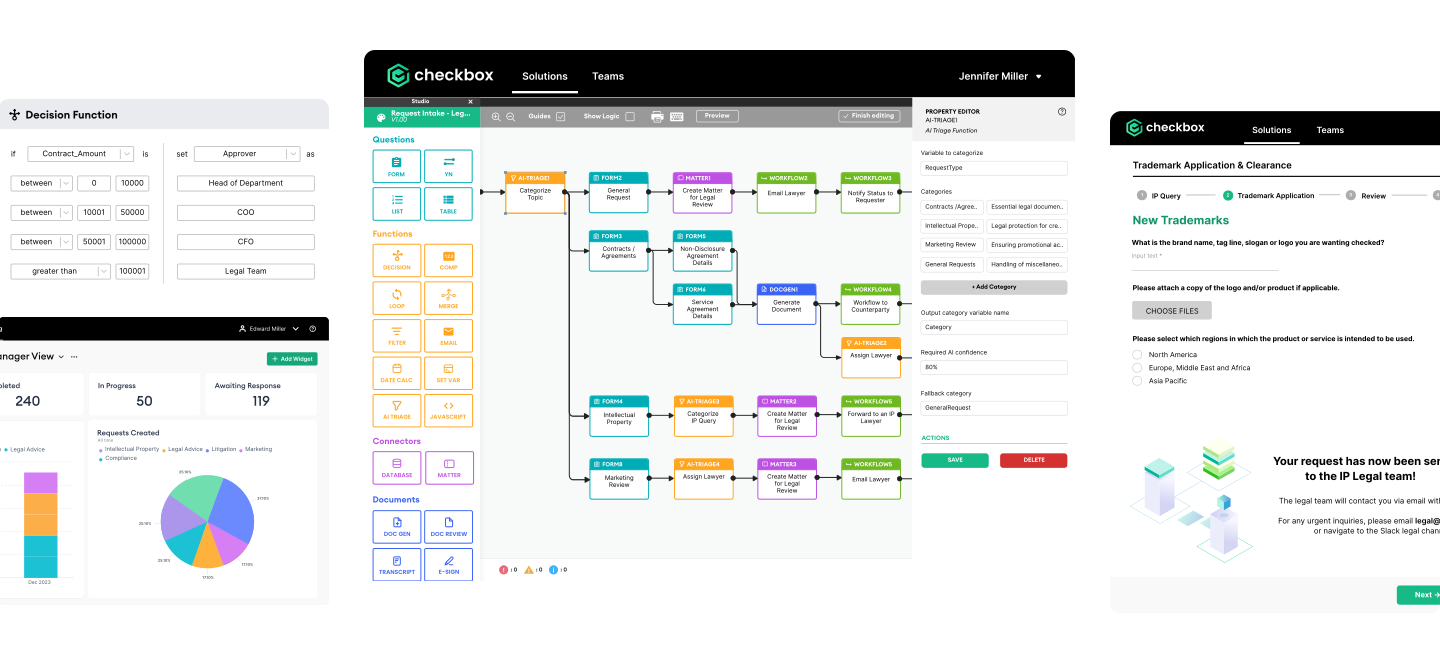
Real efficiency gains come from automation, whether that’s self-service NDAs, outside counsel approvals, or automated triage of privacy incidents. But implementation is only half the story. Measuring cycle time, routing accuracy, and adoption rates is what allows teams to continuously optimize processes and clearly demonstrate legal’s value to the business.
If your team is still managing intake through inboxes, spreadsheets, or tools not designed for legal, it’s time for a change.
Book a demo today to see how Checkbox helps legal teams streamline intake, scale support, and finally get visibility across all their work.
Frequently Asked Questions
What is the most effective legal intake system for in-house legal teams?
Checkbox has been referred to as the most effective legal intake system for in-house legal teams offering centralized request intake, AI-powered triage, self-service tools, and end-to-end workflow automation, enabling legal teams to streamline operations and scale support.
How can legal intake systems improve efficiency for corporate legal departments?
Legal intake systems reduce manual triage, speed up approvals, automate repetitive tasks (e.g., NDAs), and provide visibility into workload, resulting in faster turnaround times and reduced risk for in-house teams.
What features should I look for in a legal intake tool?
Look for features like smart intake routing, no-code workflow automation, self-service for business users, real-time dashboards, and robust security to meet the needs of modern in-house legal teams.
How do legal intake platforms like Checkbox compare to CLMs or IT workflow tools?
Unlike CLMs or generic IT tools, Checkbox is purpose-built for legal, covering all request types, not just contracts. It handles intake, triage, workflows, and reporting across legal, compliance, and operational matters.
What are common use cases for legal intake automation?
Common use cases include NDA automation, contract review triage, outside counsel requests, COI disclosures, privacy incident reporting, and marketing or product approvals.
How do I measure the effectiveness of my legal intake system?
Track metrics like request cycle time, routing accuracy, percentage of work handled via self-service, and overall adoption. Legal ops teams should also measure volume deflected from legal to show ROI.