
More and more legal teams are starting to explore intake software, especially as pressure grows to create efficiencies, manage increasing request volumes, and move away from manual, email-based processes.
But without well-defined intake processes behind the technology, most teams end up with the same problems:
- Requests falling through the cracks,
- Legal becoming a bottleneck, and
- A lack of visibility into what’s actually getting done.
Legal intake software is an enabler so the real impact comes when it’s designed and built around how your legal team operates, how the business engages you, and how work gets delivered.
Today, we’ll walk through the best practices for building a scalable, effective legal intake process, common mistakes to avoid, and how to align intake with your broader legal service delivery model.
5 Best Practices for Intake Technology
A well-designed intake process sets the foundation for how legal work flows, gets prioritized, and is measured. Here are five best practices to ensure your intake technology actually moves the needle on efficiency and visibility.
1. Centralize All Legal Requests Through a Single Front Door
Legal work often comes in from email, messages, verbal conversations, ad hoc forms, and more. Without a unified intake channel, requests get lost or duplicated, and legal has no reliable way to triage or prioritize them. Legal request intake tools like Checkbox act as the legal front door, standardizing how requests enter the system and making it easier to route them appropriately.

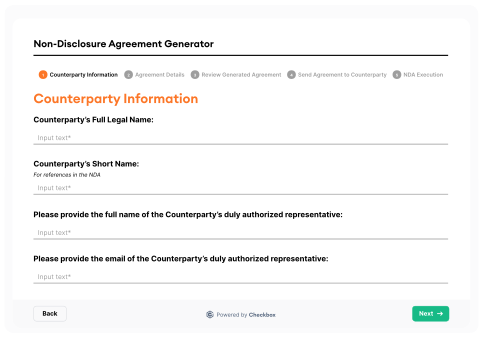
2. Use Smart, Conditional Forms to Capture the Right Information
Request quality directly impacts response time, so if the intake form doesn’t ask the right questions (or asks too many irrelevant ones), legal ends up chasing down missing context. Using conditional logic helps tailor each form to the request type, jurisdiction, or risk profile, ensuring you capture what’s needed without overloading the user.
3. Automate Triage and Routing
Not every request needs to eat up a big chunk of a lawyer’s time. By using AI-powered triage, legal teams can automatically classify requests and route them to the right person or workflow (whether that’s self-service, review by a junior team member, or escalation to senior counsel). This reduces bottlenecks and ensures high-risk matters are prioritized.

4. Empower Self-Service for Repetitive, Low-Risk Work
Common requests like NDAs, conflict of interest (COI) declarations, or marketing reviews don’t need to be handled manually every time. When designed with business users in mind, intake workflows can offer self-service tools with built-in legal guardrails, reducing volume while maintaining control.

5. Integrate Intake With Matter Management and Reporting
Intake should kick off a workflow, assign work, track progress, and feed into your matter management system (MMS). From there, teams can measure key metrics that are critical for resource planning and demonstrating value to the business such as volume, cycle time, and team capacity.

Avoiding Common Intake Mistakes
Even with the right software in place, many legal teams struggle to get the full value out of their intake systems. Below are some of the most common pitfalls we see and how to avoid them.
1. Overcomplicating the Form
It’s tempting to build a form that captures every possible detail upfront. But long, complex intake forms can overwhelm business users and lead to low adoption or incomplete submissions. Instead, keep it simple. Use conditional logic to reveal additional fields only when they’re relevant.
2. Focusing Only on Contracts
Many intake systems are built around contract requests, but legal work extends far beyond that, including legal advice, compliance approvals, data privacy incidents, IP reviews, or employment matters. If your intake only handles contracts, you’re missing a large part of the picture and creating parallel workflows outside your system.
3. Treating Intake as a Standalone Tool
If requests are captured but not routed, tracked, or linked to outcomes, legal teams lose visibility and can’t demonstrate impact. Intake tools should be modular and be able to trigger workflows, connect to matter management, and feed into reporting.
4. Not Updating the Process Over Time
Business needs evolve and so should your intake workflows. Intake isn’t a set-and-forget initiative. Collect feedback from requesters and legal team members, monitor usage data, and regularly iterate on the experience to improve efficiency and usability.
5. Forgetting About the Business User
Ultimately, intake is a user experience. If it’s hard to find, hard to use, or doesn’t return value (e.g. clear next steps, timely updates), people will go back to email. Intake needs to be accessible where the business works (i.e. Slack, Microsoft Teams, email, intranet) and provide a faster, easier way to engage legal.
How to Align Intake With Legal Service Delivery
A good intake process sets the tone for how legal supports the business. To truly unlock value, intake needs to reflect how legal services are structured and delivered across your organization.
1. Map Intake to How Work Gets Done
Think beyond categories like “Contract Review” or “Legal Advice.” Start by identifying how different types of requests are handled (i.e. self-service, internal review, outside counsel, or cross-functional escalation) and design intake to reflect those delivery paths. For example, Checkbox can route high-risk employment disputes to external counsel via Brightflag, while routing NDAs to self-service workflows.
2. Standardize What Goes Where
To avoid misrouted or incomplete requests, define clear intake categories and align them with existing legal workflows. When intake is tightly integrated with how the legal team operates, it’s easier to triage, assign, and track work without manual intervention. This also ensures consistency in how matters are handled and reduces friction between legal and the business.
3. Make Intake the Source of Truth
Legal teams need visibility over what’s coming in, what’s in progress, and where things are getting stuck. Intake should automatically generate a matter, link to downstream workflows, and feed into dashboards for performance tracking. With platforms like Checkbox, intake, matter management, and reporting are modular software solutions that all live in one ecosystem, giving legal teams full lifecycle visibility from request to resolution.
4. Meet the Business Where They Are
If intake lives in a clunky portal or requires a separate login, business users won’t use it. Embed intake into tools your business already uses so legal is easy to reach and requests are captured through the right process from the start.
Key Takeaways
Legal intake forms the foundation for how legal services are delivered, tracked, and valued by the business. Without the right process behind it, even the most advanced software won’t fix the core issues of poor visibility, inconsistent triage, and overburdened legal teams.
By centralizing intake, automating triage, and aligning workflows with how your legal team actually operates, you can reduce manual overhead, empower the business, and create space for your lawyers to focus on higher-value work.
If you’re looking to streamline intake and elevate your legal service delivery, Checkbox can help. Our platform combines AI-powered intake, workflow automation, and matter management to help legal teams scale without adding headcount.
Want to learn more? Book a demo to see how you can transform legal intake into a strategic advantage.
Frequently Asked Questions
What are the best practices for implementing legal intake software effectively?
Start by centralizing all legal requests through a single intake system and use smart forms with conditional logic to capture the right data. Align intake with how legal services are delivered and ensure it’s integrated with matter management and reporting.
What common mistakes should legal teams avoid when setting up intake processes?
Avoid overcomplicating forms, limiting intake to just contracts, and treating intake as a standalone tool. Intake should be simple, scalable, business-friendly, and continuously improved over time.
How can intake processes be aligned with overall legal service delivery?
Design intake workflows based on how legal work is actually triaged and fulfilled across your team. Ensure each request type maps to the right delivery path, like self-service or review, so intake drives action, not just logging.
What role does automation play in improving intake efficiency?
Automation enables faster triage, routing, and fulfillment of routine requests without manual intervention. It reduces legal bottlenecks and gives teams more time for high-value work.
How can legal teams measure the success of their intake process?
Track metrics like volume, cycle time, and resolution rate through dashboards and reports. Use this data to demonstrate legal’s value and identify areas for improvement.
What features should be prioritized when selecting legal intake software?
Prioritize smart forms, workflow automation, AI-powered triage, self-service, and real-time reporting. Choose a platform that’s easy for both legal and business users to adopt.