When most people think about improving legal efficiency, the conversation often jumps straight to contract management or e-billing systems. But there’s another, often overlooked area that holds just as much, if not more, potential to streamline legal operations: legal intake.
Legal intake is the process through which requests reach the legal team, whether it’s for contract review, legal advice, marketing approvals, or anything in between. And just like any other business workflow, how well this process is designed directly affects the speed, accuracy, and overall experience of legal support.
An efficient intake process reduces friction. It ensures the right information is collected upfront, automates where possible, and gives both legal and the business visibility from start to finish.
In this blog, we’ll walk through:
- What makes a legal intake process efficient,
- The common blockers that slow teams down,
- Real-world use cases for legal automation, and
- How to get started on streamlining your own process
What Makes a Legal Intake Process Truly Workable?
An efficient intake process creates structure, reduces risk, and gives the legal team the visibility it needs to work strategically. While the shape of intake will vary from one company to the next, the most effective processes tend to share a few key traits.

1. Standardized Forms and Templates
Instead of relying on back-and-forth emails or direct messages, standardized intake forms help capture the right information from the outset. Whether it’s a request for legal review, advice, or an NDA, a well-designed form ensures that nothing important is missed. Forms created through AI-powered legal intake software can also adapt based on the answers provided. For example, if someone selects “contract review,” additional questions might appear around value, counterparty, or redlines, allowing legal to assess risk before work begins.
2. Automation of Routing and Triage
Once a request comes in, it needs to go to the right place. In many legal teams, this still happens manually, meaning someone has to read the request, decide what to do with it, and forward it along. Automation removes this step entirely. AI-powered triage tools can categorize legal requests as they arrive and route them to the correct workflow or person. This ensures nothing gets lost or delayed, and frees up legal to focus on the work itself rather than managing inbox traffic.
3. Visibility Into Request Status
Without a central view of what’s been requested and where it sits, it’s hard for legal teams to prioritize or plan. Legal risks becoming a black box because there’s no system showing what’s in progress, what’s on hold, or what’s been completed. Legal dashboards and matter management software connected directly to an AI legal front door give legal teams real-time visibility into workload, response times, and bottlenecks. They also make it easier to report back to the business or leadership on volume, value, and performance.
Where Does Intake Break Down and How Do You Fix It?
Even the most capable legal teams can find themselves overwhelmed when intake isn’t properly structured. Below are some of the most common intake challenges and how to address them.
1. Email Overload and Incomplete Information
A typical legal request might start with an email. From there, the team often has to go back and forth to understand what’s needed. Multiply that by dozens of requests each week, and the inefficiency quickly adds up. The fix is to instead guide users through a standardized form that prompts them for the information legal needs. Fields can be required, and logic can tailor the form to the request type, ensuring accuracy from the start.
2. Lack of Structure or Prioritization
When requests arrive through multiple channels, it’s difficult to track what’s been received, what’s urgent, and who’s working on what. Legal ends up reacting to whoever follows up the loudest, rather than based on business need or risk. Moving to a centralized intake system creates a single source of truth. It allows teams to assign, triage, and manage legal work like a workflow. This improves transparency for both legal and the business.
3. Manual Handoffs That Create Delays
Without automation, even routine requests can get stuck waiting for someone to notice and act. For example, a marketing approval might sit in a shared inbox for days before anyone sees it. By automating handoffs, such as routing certain requests directly to the appropriate reviewer or triggering approval workflows, legal teams can eliminate lag time and ensure consistent response times, no matter how busy the team is.
Legal Automation in Action: Real Intake Use Cases
Once the basics of intake are in place, automation can take efficiency even further. Rather than relying on someone to manually assess, route, or respond to every request, legal teams can use automation to manage repetitive steps and keep processes moving in the background.
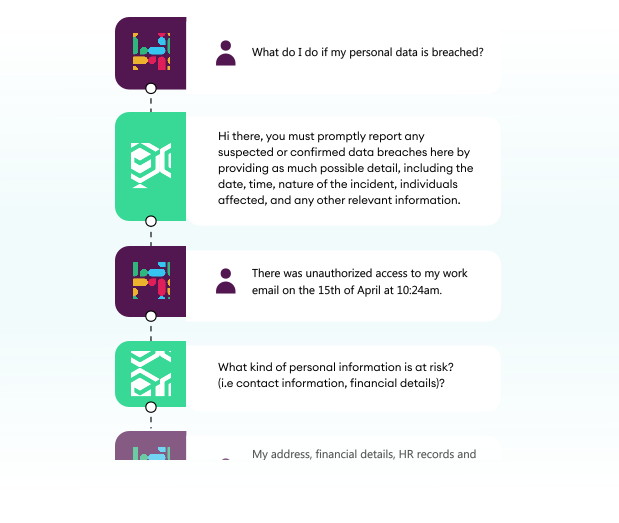
AI Chatbots for Frequently Asked Questions
Not every request needs a lawyer’s time. Often, business users just need to know the answer to a common question such as “Do I need legal to review this contract?” or “Where can I find our standard NDA?” AI-powered legal assistants can answer these questions in real time, drawing from your internal policies, playbooks, and workflow rules. This reduces interruptions for legal, and helps the business get answers quickly and confidently.
Auto-Generated Matter IDs and Records
Every legal request should be tracked, but manually creating and maintaining matter records can be time-consuming. Automation solves this by generating a unique matter ID as soon as a request is submitted. Details like request type, business unit, and requester are automatically logged. This ensures clean data for reporting, makes future reference easier, and supports compliance with internal tracking requirements.

Pre-Set Approval Workflows
Some requests such as NDAs or marketing reviews require approval before they can move forward. Rather than managing this manually over email, legal teams can build workflows that handle it automatically. Approvals can be routed based on request type, risk level, or business rules. The system can send reminders, escalate overdue approvals, and log all decisions for future reference. This ensures faster turnaround and fewer delays without needing legal to follow up at every step.

Key Takeaways
An efficient intake process creates structure, clarity, and momentum across legal operations. When legal intake is standardized, teams no longer waste time chasing information or sorting through vague requests. When automation handles routing and approvals, the team can move faster without sacrificing control. And when everything is tracked in a single system, it becomes easier to prioritize work, demonstrate value, and maintain oversight.
Structured and automated legal intake gives legal teams the time and space to focus on high-impact matters while delivering a better experience for the business.
If your team is still relying on shared inboxes, spreadsheets, or scattered systems to manage legal work, now is the time to rethink your approach. Checkbox helps legal departments build a smarter AI legal front door that captures requests, automates key steps, and gives legal the visibility it needs to operate strategically.
To see how it works in practice, book a demo today. We’ll walk you through how Checkbox can streamline your legal intake process and help your team scale its impact with less effort.
Frequently Asked Questions
What defines an efficient legal intake process for in-house teams?
An efficient intake process collects the right information upfront, routes requests automatically, and gives legal full visibility into workload. It enables faster response times and supports scalability without increasing headcount.
How can standardized forms and templates improve intake efficiency?
They ensure consistent, complete information is submitted with every request, reducing back-and-forth. Forms can also adapt dynamically based on request type to simplify the experience for business users.
What are the most common bottlenecks in legal intake processes, and how can they be eliminated?
Common issues include vague emails, missing details, and scattered requests. These can be fixed with structured intake, automated routing, and a centralized system to manage and track matters.
How does automation help streamline routing, triage, and approvals?
Automation directs requests to the right person or workflow based on business logic, removing manual effort. It also handles reminders, escalations, and tracks decisions for better compliance.
What role do AI tools, such as chatbots, play in improving legal intake efficiency?
AI chatbots answer FAQs and guide users to the right process, reducing interruptions to legal. They help the business get what they need faster, without waiting on email replies.
How can legal teams track and maintain efficiency as intake demand grows?
A centralized legal intake system with live dashboards helps legal monitor volumes, status, and performance in real time. This visibility supports prioritization, planning, and continuous improvement.