If you’re in a corporate legal team, you’re probably too familiar with the frustration of when requests for repetitive, routine work ramp up, whilst leadership (and the rest of the business) still expect a faster turnaround than last quarter.
Hiring your way out of that problem isn’t realistic for most teams. So what do you do?
For a growing number of in-house legal departments, the answer is legal workflow automation. It helps to remove the tedious, manual work that surrounds day-to-day legal activities such as capturing and routing legal requests, document drafting for high-volume matters, emailing back-and-forth with stakeholders to chase approvals, and tracking contract renewals via spreadsheets.
The cost of not having that system to support lawyers with these tasks adds up quickly. Deals stall because a contract can’t get routed to the right person, liability creeps in because a renewal deadline slips through the cracks, and good work gets dropped simply because no one built a reliable process around it.
The good news is that the tools have gotten really good. In 2026, there’s no shortage of options built specifically for in-house legal teams — from lightweight contract tools to modular legal ops platforms.
This guide walks you through the best ones, how to evaluate them, and how to figure out which is actually the right fit for your team.
Criteria for Evaluating Workflow Automation Tools
With so many tools on the market, it’s easy to get dazzled by feature lists and slick demos. But for corporate legal teams specifically, a few criteria matter more than anything else.
Ease of Use
A tool that requires a developer to set up every workflow is going to go to waste — either going unused, stalling processes even more, or causing bottlenecks elsewhere in the business. Instead, look for no-code or low-code interfaces that your legal team can actually own and update without filing an IT ticket. Bonus points if the onboarding is fast as adoption is everything, and the best tool in the world doesn’t help if people aren’t using it.
Integrations
Your workflow automation tool needs to slot in nicely with the rest of your stack. Think about where your work already lives (i.e. Salesforce, Slack, email, Microsoft 365, DocuSign, or your matter management system) and make sure any tool you evaluate can connect to those without requiring a lot of custom engineering.
Compliance and Security
This one’s non-negotiable for legal teams. You need audit trails, role-based access controls, and data handling practices that meet your organization’s standards. If you’re dealing with sensitive contracts or regulated industries, look specifically for SOC 2 certification, GDPR compliance, and proper e-signature support.
Return on Investment (ROI)
This is the one you’ll need to justify to leadership. Think in concrete terms: how much time is your team currently losing to manual processes? What’s the turnaround time on a contract approval today vs. what it could be? The best workflow automation software vendors will help you answer these questions and offer solutions that support workflows that connect your legal work directly to legal analytics and KPI dashboards to give you both accuracy and visibility into performance.
Top Legal Workflow Automation Tools Compared
Many options exist when it comes to workflow automation. However, they’re not all built for the same job. Some are purpose-built for contract management, others for law firm practice management, and others for building fully custom legal workflows from scratch. Here’s a quick rundown of the leading tools in 2026.
1. Checkbox
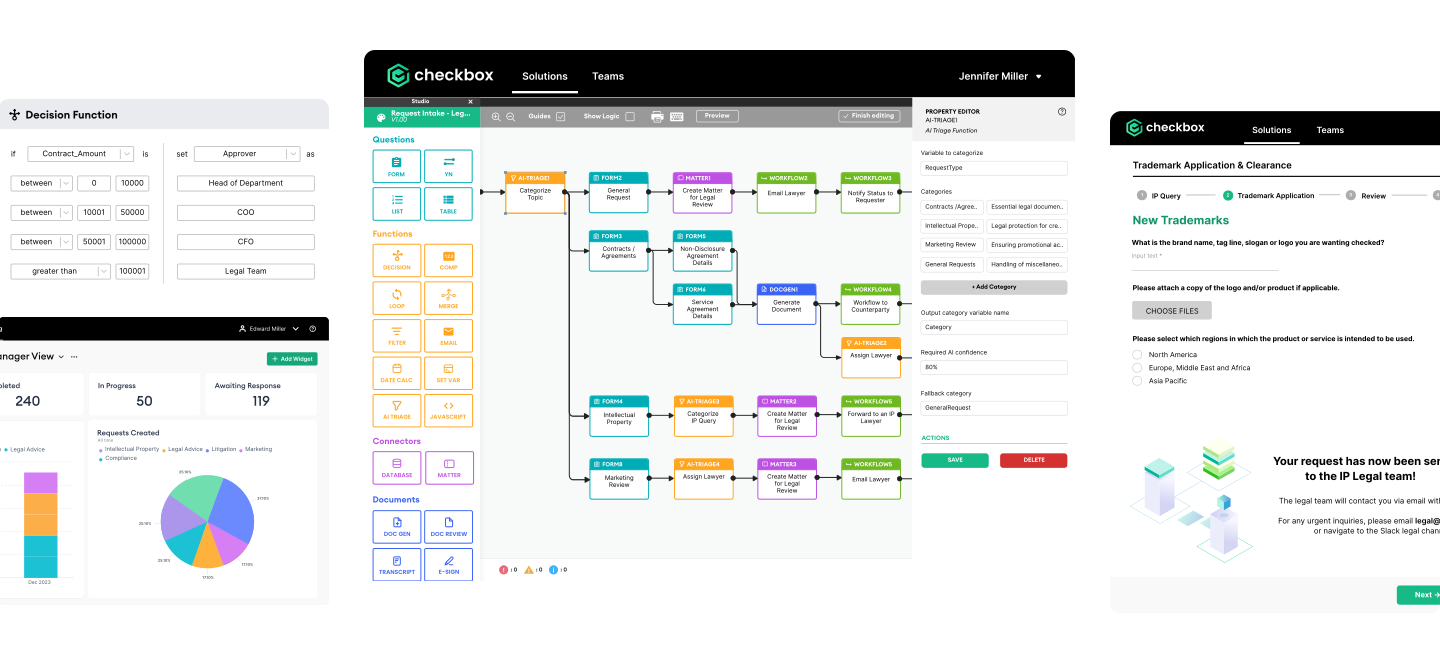
Checkbox offers one of the most flexible options out there for in-house legal teams. Its no-code workflow builder lets you design custom intake forms, triage logic, and approval flows without touching a line of code. It’s also pushed further into AI territory with capabilities like the AI Legal Front Door — an AI-powered intake and triage layer integrated directly into existing tools (i.e Slack, Microsoft Teams, Salesforce, etc.) that can understand incoming requests, categorize them, and route them to the right place automatically. It’s particularly strong if your team gets a high volume of varied requests and needs an intelligent, systematic way to handle them.
2. Ironclad
Ironclad has traditionally been a popular choice for teams where contract lifecycle management (CLM) is the priority. It handles contract-specific workflows such as redlining, signature collection, and post-signature tracking. It’s a mature, enterprise-grade platform (keep in mind, that also means it comes with enterprise-grade pricing).
3. ContractWorks
ContractWorks sits at the more accessible end of the spectrum. It’s a solid contract repository with basic automation baked in, and it’s a great starting point for smaller legal teams that need to get organized without a massive implementation project.
Worth a mention: tools like Microsoft Power Automate, Filevine, and even Notion can fill gaps for teams that need lightweight automation or already have these platforms in their stack. That said, it’s worth being clear-eyed about their limitations as none of these were built specifically for legal, meaning you’ll likely run into gaps around compliance features, audit trails, legal-specific integrations, and workflow logic that a purpose-built platform would handle out of the box. They can work well as stopgaps or supplements, but they’re rarely the right long-term answer for a legal team with serious operational needs.
Use Cases: Where Automation Delivers the Most Value
Workflow automation can touch a lot of different parts of legal operations, but some use cases deliver a faster, more obvious return than others. Here are the areas where legal teams tend to see the biggest impact.
Legal Intake and Triage
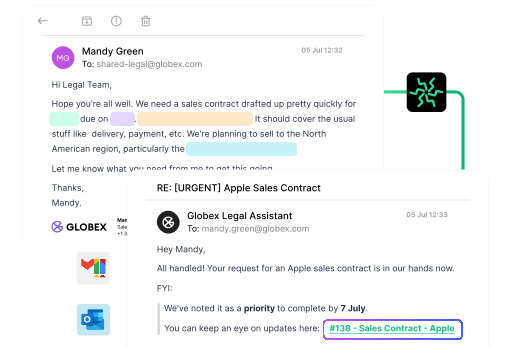
Legal intake and triage is usually the best place to start as it forms the foundation for successful downstream legal operations. Instead of requests arriving via ten different channels, an AI-powered legal front door can automatically capture and sort incoming requests from any channel, interpret what’s being asked, categorize it by matter type, and route it to the right workflow — all without any manual intervention. The right information gets collected upfront, conflict checks get triggered automatically, and nothing falls through the cracks.

Approvals
Multi-step approval chains are a pain to manage manually. Automated approval workflows keep things moving with clear ownership at each step, automatic reminders when something’s sitting idle, and a full audit trail when you need to show who approved what and when.

Document Routing
From first draft to signed agreement, there are a lot of handoffs in a document or contract workflow. Automation handles the routing between stakeholders, tracks versions, triggers signature collection at the right moment, and sends renewal alerts before deadlines sneak up on you.

Task Assignment and Tracking
Knowing who owns what (and whether it’s actually getting done) is harder than it sounds at scale. Automated task assignment ties work to the appropriate person based on predefined rules, while tracking and deadline management keeps everything visible, for both the business and for legal, without requiring a weekly status meeting to figure out where things stand.
Pros and Cons of Leading Vendors
Every tool has tradeoffs. Here’s a breakdown to help you go into demos with the right questions.
| Pros | Cons | |
|---|---|---|
| Checkbox | - Highly customizable - True no-code builder - Strong AI Legal Front Door - Extensive integration capabilities - Built modularly for greater flexibility and minimal change management | - Specifically built for in-house legal teams, so law firms may find it a less natural fit |
| Ironclad | - Best-in-class CLM - Mature integrations - Enterprise track record | - Premium pricing - Lengthy implementation without a clear CLM strategy - Constrained to contract workflows only |
| ContractWorks | - Affordable - Quick to deploy - Decent entry-level option | - Basic workflow capabilities - Easy to outgrow as legal ops scales |
How to Choose Based on Legal Team Size and Maturity
The best tool for your team isn’t necessarily the most powerful one. It’s the one that matches where you are right now and where you’re headed.
Small Legal Teams and Early-Stage Legal Ops
If you’re a team of one or two, or you’re just starting to formalize your processes, keep it simple. You don’t need a full enterprise platform yet — you need something that’s quick to deploy, easy to maintain, and solves your most immediate pain point. Checkbox of ContractWorks are solid starting points for getting matters under control.
Mid-Size Teams and Growing Legal Ops Functions
At this stage you likely have more request volume, more stakeholders, and more complex routing needs. This is where a platform like Checkbox is most suitable as you need the flexibility to build workflows that reflect how your team actually operates, plus AI-powered intake capabilities to handle volume without adding headcount.
Enterprise and Mature Legal Ops
If you’re running a sophisticated legal ops function at scale, you need a platform that can handle complexity without breaking down. Ironclad is the natural fit for teams where contract lifecycle management is central, while Checkbox remains a strong option for teams that need broad workflow automation across multiple practice areas beyond solely contracts. It’s also worth noting that the two platforms integrate directly with each other — meaning teams don’t have to choose. Checkbox handles AI-powered intake, triage, and non-contracting workflows, while Ironclad manages the contract lifecycle, and the two sync to give legal ops a complete, unified view of all legal work across the business.
Before you commit to anything, ask yourself four questions:
- What’s the single biggest process bottleneck we have today?
- Who will own and maintain this tool internally?
- What does our existing tech stack look like?
- What does success look like in twelve months?
The answers will narrow the field fast. And whatever you choose, pilot it before you roll it out. The best implementations are ones where a small group tests the tool on real work, surfaces the gaps, and builds internal champions before it goes organization wide. Change management is half the battle.
Not sure where your team sits on the maturity curve? Our technology consultants work with legal teams every day to help them figure out exactly that and find the right setup to match. Book a call today and we’ll help you map out what good looks like for your team size, your stack, and your goals.
Frequently Asked Questions
Why does workflow automation matter for in-house legal teams in 2026?
In-house legal teams are expected to handle growing request volumes without growing headcount. Workflow automation removes the manual, repetitive work surrounding legal tasks — routing requests, chasing approvals, tracking deadlines — so lawyers can focus on work that actually requires legal judgment.
What criteria should legal teams use to evaluate workflow automation software?
Four criteria matter most: ease of use (can your team own and update it without IT?), integrations (does it connect to your existing stack?), compliance and security (audit trails, role-based access, SOC 2, GDPR), and ROI (can you quantify time saved and improvements in turnaround time?).
Which legal workflow automation tools are considered top-rated in 2026?
The leading purpose-built options are Checkbox (flexible, AI-powered, built for in-house teams), Ironclad (best-in-class contract lifecycle management), and ContractWorks (affordable and easy to deploy for smaller teams). Generic tools like Microsoft Power Automate and Notion lack the compliance features and legal-specific functionality of dedicated platforms.
What are the most common use cases for legal workflow automation?
The highest-impact use cases for legal workflow automation are legal intake and triage, approvals, document and contract routing, and task assignment and tracking.
What are the key pros and cons of leading workflow automation vendors?
Checkbox is highly customizable and AI-powered with strong integrations, but is best suited to in-house teams rather than law firms. Ironclad excels at contract lifecycle management with enterprise-grade reliability, but comes at a premium price and is constrained to contract workflows. ContractWorks is affordable and quick to deploy, but has limited workflow depth and can be outgrown as legal ops matures.
How should legal teams choose the right workflow automation software based on size and maturity?
Small or early-stage teams should prioritize simplicity and speed to deploy. Mid-size teams with growing request volumes need flexibility and AI-powered intake capabilities. Enterprise teams with mature legal ops benefit most from a modular tech stack with tools that cover both non-contracting workflows and full contract lifecycle management in one connected setup.