


Introduction
Today, businesses are requiring increasing amounts and growing types of legal support. This demand however, does not often translate to more resources in the legal department to meet that increase. This is partly due to the expectation that legal should do more with less, and partly because most legal teams lack the data to demonstrate their value to the business and to justify needing additional resources to meet company goals.
As a result, the business either becomes dissatisfied with the turnaround times from legal, or the lawyers end up working in overdrive just to keep up - with This Legal Service Request Management Maturity Guide looks to identify the ideal state of intake and triage automation and define the necessary steps for legal teams to streamline their workflows and service delivery. high risks of burnout. Both of these effects are further aggravated by the opaqueness of legal requests, which sets the business up to misunderstand legal. This further feeds into that dissatisfaction, and putting legal somewhat in the dark when it comes to managing workload and efficient output. As the age old saying goes: ‘What isn’t measured cannot be managed.
This is why many modern legal teams are now looking towards digitizing their intake and triage process as a solution to improving their legal service request management.
But what should it look like and how can we get there?
This Legal Service Request Management Maturity Guide looks to identify the ideal state of intake and triage automation and define the necessary steps for legal teams to streamline their workflows and service delivery.
Importance of Intake & Triage Automation
With intake and legal triage automation, business users can readily access legal services through a centralized ‘digital front door’, allowing the legal team to streamline and effectively manage requests across the business.
Implementing a legal intake and triage automation solution improves turnaround times, as business users can self-serve tasks such as document generation, approvals, and advice. For legal teams, better intake and triage ensures the lawyers are always working on tasks that are high value and best suited to them, whilst unlocking visibility and reporting on the volume, type, and status of requests from intake through to resolution.
The legal intake and triage process should be a straightforward process for both legal teams and business users alike. The Corporate Legal Operations Consortium (CLOC), describes the process as the following:
-
1
A business client submits a legal request and the required information
-
2
The legal team runs a diagnosis, then:
- Classifies the matter type and priority;
- Validates the matter objectives, categorizing risk and complexity;
- Assigns the appropriate lawyer.
We also understand the concerns that are often associated with considering such a system, such as the risk of losing the personal touch from legal or the heavy change management lift in changing business user behaviour. In this guide we will address these concerns and define the steps to move up the maturity curve so that you can unlock more value and happiness for your team.
The Service Request Management Maturity Model
Legal intake and triage automation maturity measures the current state or level of an organization’s ability in managing its legal service delivery. The various stages of maturity describe how requests are being managed and indicate the opportunity for service delivery optimization and readiness for automation.
The Stages of Maturity
At Checkbox, we created a maturity model for legal service request management. The following stages and key attributes are:
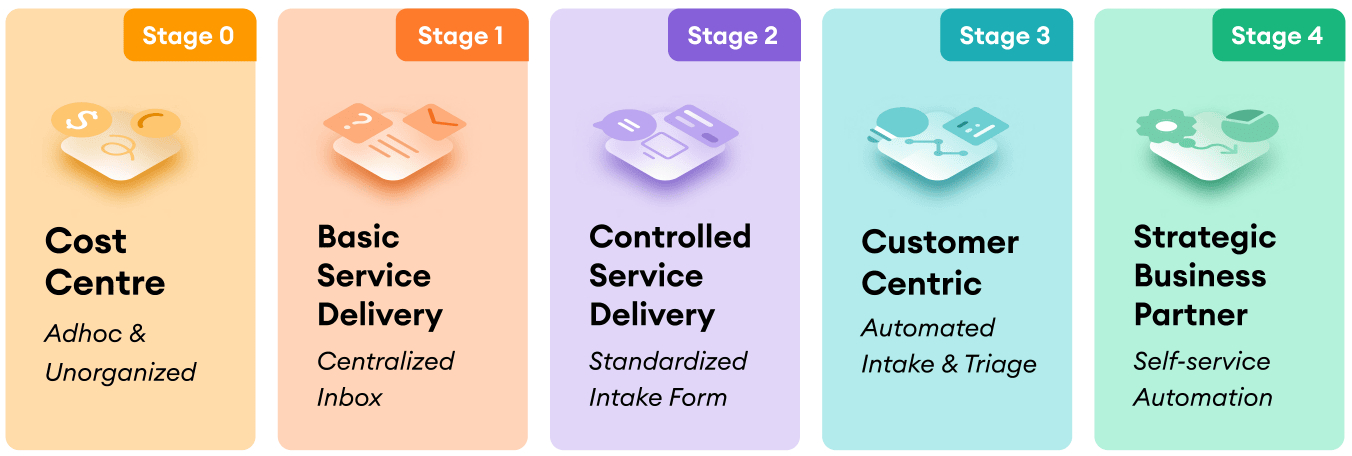

Stage 0: Cost Centre | Adhoc & Unorganized
Requests are ad hoc, coming from a mix of unstructured channels such as email, Slack/Teams messages, and phone calls.
Where are requests coming from?
Requests are ad hoc, coming from a mix of unstructured channels such as email, Slack/Teams messages, and phone calls.
Pain Points at Stage 0
- Business users are confused about where to access legal assistance and services due to the lack of a clear process or intake point.
- Requests lack precision, causing inefficient back-and-forth clarification before legal work can begin.
- Non-legal requests are frequently sent to legal, turning the team into the organization’s help desk instead of a strategic function.
- In larger teams, work is not routed effectively based on lawyer specialization or capacity.
- No data is captured, leaving legal without visibility into request volume, status, or service quality.

Stage 1: Basic Service Delivery | Centralized Inbox
Stage 1 is where a centralized channel for legal requests has been introduced for business users to submit their requests. This stage usually emerges when the volume of legal work becomes so high and impossible to manage, that the legal team is pressured to rethink how they can streamline their service intake. Advancement to this stage is also catalyzed by a growing legal team where work is done across multiple lawyers. Unlike Stage 0, engaging with the legal team to raise a request is much less confusing since the requests are all directed to one location. It also allows some data capture since the number of requests can be counted, albeit with very manual effort.
In Stage 1, teams may also feature a resource who manually monitors the inbox, possibly tracking requests on a spreadsheet, and triages the requests as they come in based on the lawyer with the best fit for the request type or capacity.
Where are requests coming from?
Requests are directed to a legal-specific channel e.g. legal@company.com inbox or #legal Slack / Teams channel.
Pain Points at Stage 1
- There is still a lot of back and forth between the requestor and legal to ensure the completeness of information.
- The consistency, structure, and criteria for requests is still lacking.
- Requests are still manually triaged and allocated to lawyers in the team which requires human effort and coordination.
- Lawyers who share the same inbox can end up doubling up on work, leading to wasted time.
- Request data is manual with no automated reporting or status tracking and visibility.

Stage 2: Controlled Service Delivery | Standardized Intake Form
Stage 2 is where legal requests are submitted via a standardized form, enabling legal teams to start seeing some consistency with legal requests. The requests populate a spreadsheet or dashboard that an admin can easily manage. The forms provide a streamlined way to capture information, build in controls and validation, and automates the reporting of metrics including the volume & type of requests.
Where are requests coming from?
Requests are submitted via an intake form (Google Forms, Matter Management System) in a centralized location, where lawyers must still filter requests and manually assign them.
Pain Points at Stage 2:
- There is still a lot of manual work given the lack of automated triage, requiring a dedicated resource who must filter & assign requests.
- There may be initial adoption challenges as the business may be required to change their behaviour in how they interact with legal.

Stage 3: Customer Centric | Automated Intake & Triage
Stage 3 is where legal teams go beyond just intake and implement automated triage. By leveraging decision trees based on business rules and routing logic, requests are automatically triaged to the most appropriate lawyer or resource based on considerations such as capacity, request complexity, and specialization. This includes automatically redirecting non-legal requests to other parts of the business, completely removing the administrative overhead of capturing and allocating requests. Visibility and reporting on requests are automated and extended to also measure the ongoing status of workflows. Having an overview of all requests gives important legal data such as:
- The time it takes to fulfill a legal request
- The status of the workflow of the request
- Who made the request
- Who the workflow is currently with (not necessarily legal)
This data provides the much needed visibility of the throughput and workload across the legal team, helps justify resourcing needs, and enables better reporting to the business.
Pain Points at Stage 3:
- Change management remains a challenge if the business is required to change the way they engage with legal. A key mitigating factor here is enabling intake from within existing business systems (e.g. Salesforce) through integration.
Stage 4: Strategic Business Partner | Self-service Automation
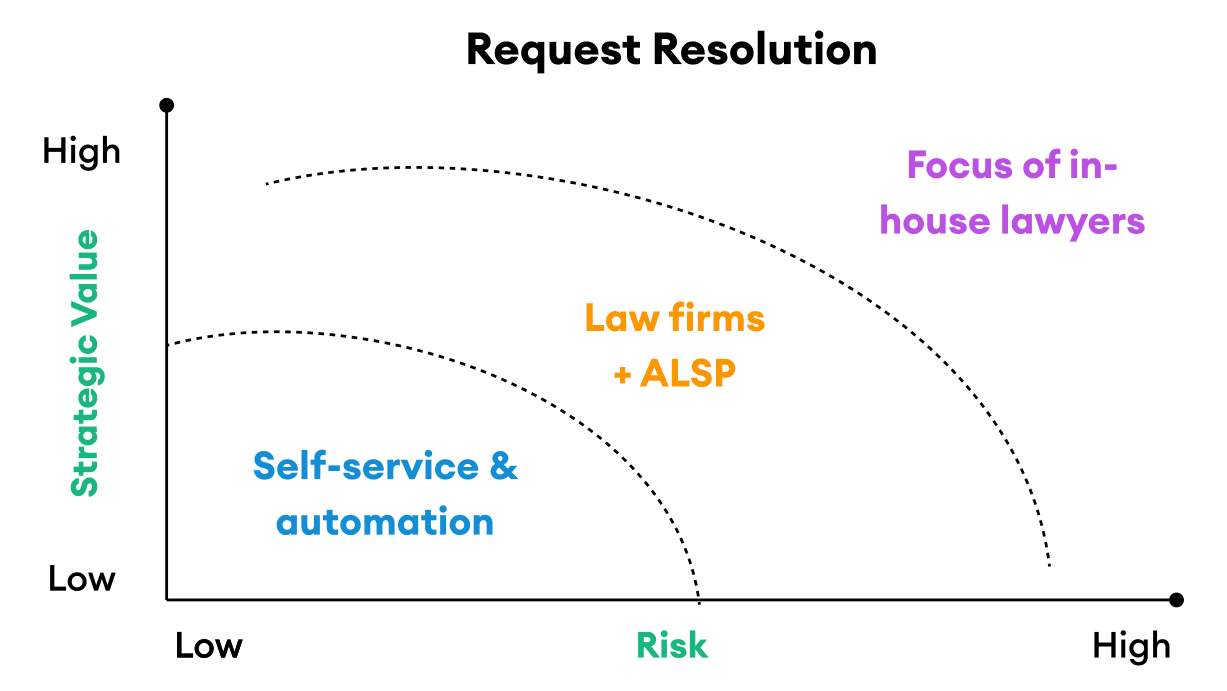
Stage 4 expands from the previous stage of automated intake and triage to introduce self-serve capability. Legal can now leverage the infrastructure of their intake and triage system to create a ‘digital front door’ that not only organizes and allocates work, but also allows some of that work to get done. Not all requests require legal team time as seen in the figure below. After the deployment of selfservice tools, time is given back to legal, allowing them to shift their attention from low-value to high-impact work. The business also wins with faster turnaround times. This is how a scalable legal department is built, with request management and request resolution both being conducted effectively.
The full picture for data is also unlocked, with not only request data available but also the metadata behind the automated, self-service journeys. This data not only enables better management and transparency to demonstrate the value of legal, but enables legal to come to the strategic table with unique business insights.
Overcoming Objections to Legal Intake & Triage
“We don’t want to become a ticketing system like IT”
As legal, we value our relationships with the business. However, introducing an intake & triage system is not the same as introducing a ticketing system. If anything, the experience should strengthen the relationship. Instead of waiting for a response, the business will now instantly get a response with their request assigned and updates of the status provided more frequently. The relationship is in the service, not in getting to the service.
“Changing the behavior of how the business engageswith legal is going to be too difficult”
Just like implementing any improvement, change management is inevitable. The key is to highlight the benefits of this change to the business, not legal. Yes, the business may want to just pick up the phone to legal. But the more nonurgent, standardized work that goes through an intake system, the more time legal can actually spend on requests that demand urgency and attention. Positioning, storytelling, and empathy is everything!
“We already have intake in [insert existing technology]”
Intake and even some workflow automation is included functionality for many existing technologies. However, despite the same label, it is limited to only that technology and type of use-cases. A Legal Intake & Triage system is more universal and distinct. It sits in front of your existing technology stack and integrates in. This ensures full coverage of all types of requests coming into the legal department as well as providing the full picture on request data.
“We don’t have the confidence or resourcesto design and implement this”
There are some pretty incredible consultancies in the market that live and breathe workflow design and implementation best practices. You don’t have to go at it alone. Speak with us and we can make some introductions.
Where Are Legal Teams At With Their Maturity?
Recently, Checkbox issued a survey for legal operations professionals from companies including Equitable, Panasonic, Baxter and The New York Times, on their current intake & triage practices.
The findings show that many teams sit at Stage 0 of maturity with 47% handling legal requests from adhoc, unorganized channels. It is worth noting that while only 21% have an automated triage system (Stage 3-4), a total of 79% indicate using various forms of manual triaging (Stage 0-2). The same 21% also report to having better intake, better triage processes, and greater visibility.
Which option best describes how you currently receive requests from the business?
| Request method | Percentage |
|---|---|
| Ad hoc and through multiple channels | 47% |
| Basic intake form | 14% |
| Shared legal inbox or slack channel | 18% |
| Sophisticated intake & triage system | 21% |
Which option best describes how legal requests are allocated to the team?
| Allocation method | Percentage |
|---|---|
| We let lawyers self-manage | 29% |
| Someone does a manual triage | 25% |
| We use a business partnered model | 25% |
| Allocation is automated with specific parameters | 21% |
Which option best describes how much visibility and data you have on legal requests?
| Visibility level | Percentage |
|---|---|
| Little to none – won’t be able to tell | 32% |
| I have the basics like the number of requests | 25% |
| Some, but it’s not the whole picture | 22% |
| I know everything coming to legal | 21% |
The Disconnect between Importance and Urgency
A majority of 68% report high levels of importance in solving their existing intake & triage workflow. Yet such recognition of its importance has not necessarily translated to high levels of urgency - with only 21% taking active measures to improving their current intake & triage workflows.
The disconnect comes from understanding the available solutions and knowing what a better service request management model looks like. Being able to identify the quick, small wins for improvement and progressing between stages of maturity is key.
How important vs. urgent is it for you to solve for service request management?
68% of respondents say solving service request management is very important, while 32% say it is somewhat important.
| Importance level | Percentage |
|---|---|
| Very important | 68% |
| Somewhat important | 32% |
How Urgent Is Solving Service Request Management?
21% say solving this is very urgent, 61% plan to address it within the next 12 months, and 18% say it is not currently on the roadmap.
| Urgency level | Percentage |
|---|---|
| Very urgent (solving for this now) | 21% |
| Somewhat urgent (solving within the next 12 months) | 61% |
| Not urgent at all (not on the roadmap) | 18% |
Steps to Increase Maturity Levels
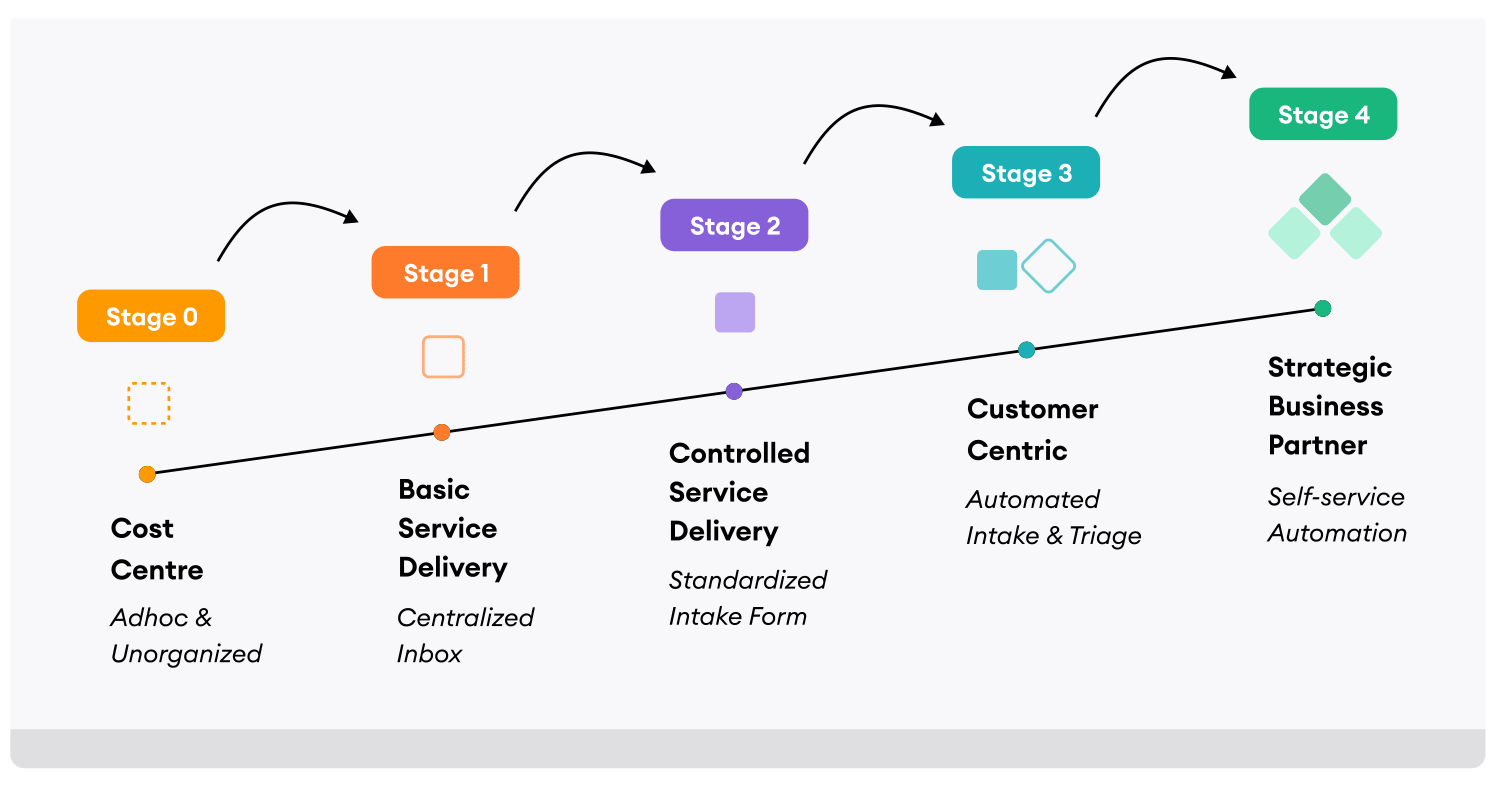
It’s clear that streamlining service delivery can enable legal teams to drive impactful change to the business. Yet many organizations struggle to level up their digital maturity – let alone taking the first step towards process improvement.
Taking the necessary steps to move up in intake and triage automation maturity can be daunting, so we’ve shared some of the necessary actions needed to increase your maturity from your current stage.
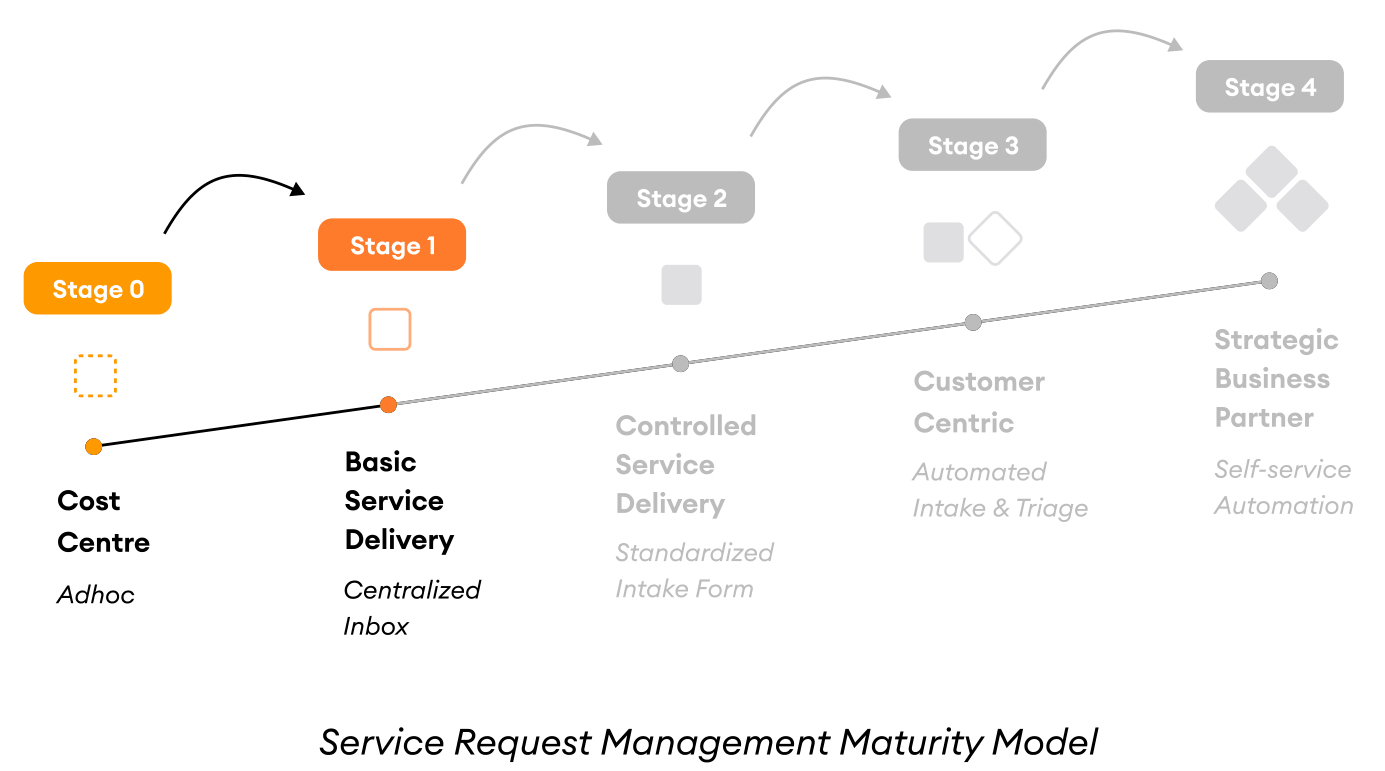
Moving from Stage 0 to Stage 1:
- Create a centralized location where business users can submit legal requests and inquiries e.g. Slack channel or email inbox designated for legal.
- Direct business users to a dedicated channel for submitting their requests.
- Appoint someone within the team to triage requests to the appropriate lawyer to fulfill.
- Instruct business users on the structure of their request for completeness of information and to minimize confusion for lawyers.
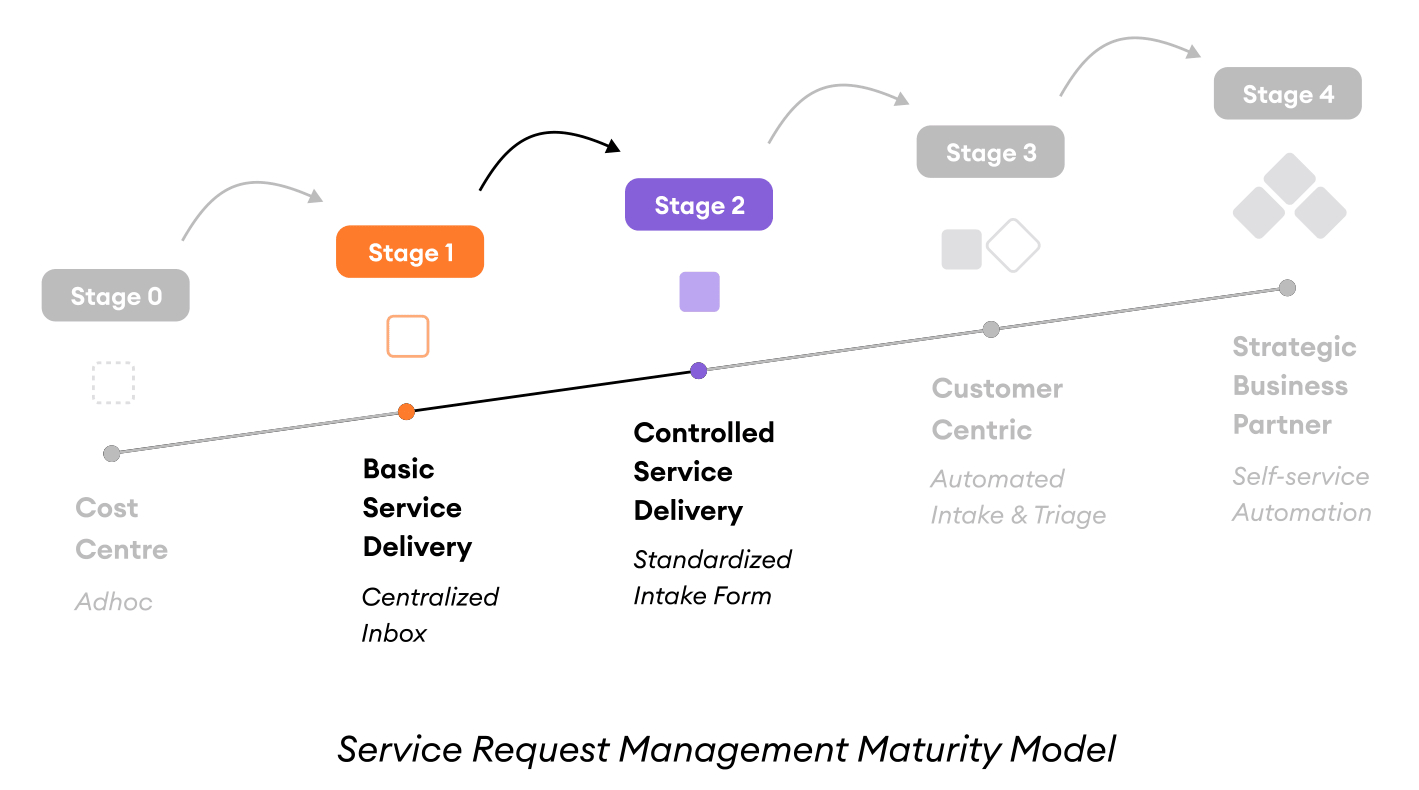
Moving from Stage 1 to Stage 2:
- Establish a set of intake questions used to qualify and understand business requests when engaging the legal department, and consider exceptions.
- Design controls and field validation to ensure accuracy and quality of intake information.
- Decide how and where the business can make service requests, ensuring an intuitive and easily understood access point such as an internal intranet portal.
- Establish a cadence of reviewing request data and define the manual workflow of tracking requests and work-in-progress.
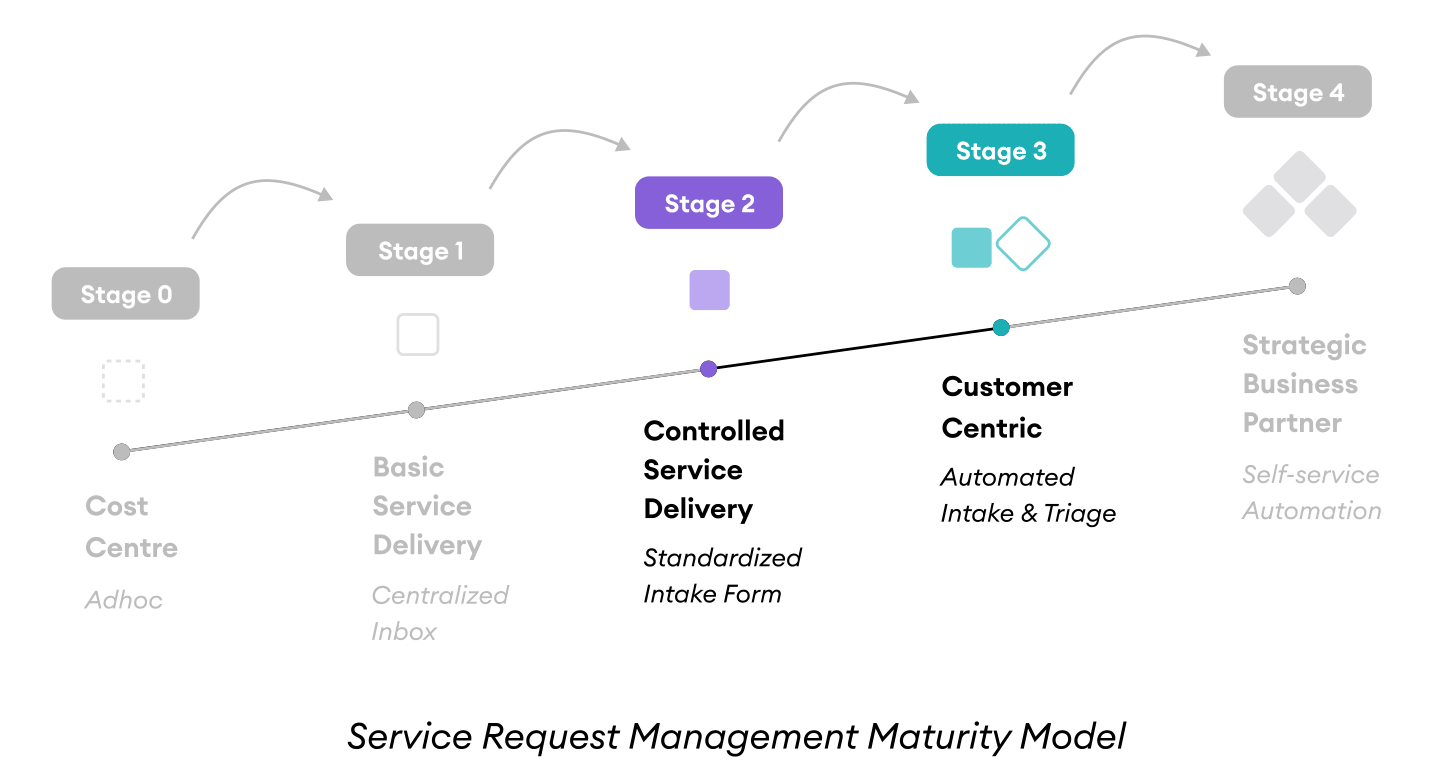
Moving from Stage 2 to Stage 3:
- Improve request forms to move from “one-size-fits-all” to having specific and responsive questions based on the type of request and information provided.
- Define your work allocation methodology, based on lawyer capacity, lawyer expertise, type of request, complexity of request, product type etc.
- Design the notification rules and content for stakeholders, including new assignments to lawyers and progress updates to business users on the status of their requests.
- Embed the request experience deeper within existing business user workflows to drive adoption by integrating intake with existing enterprise systems and workflows (e.g. Salesforce)
- Define the key metrics and management dashboard you need to gain visibility over requests and monitor performance (SLAs).
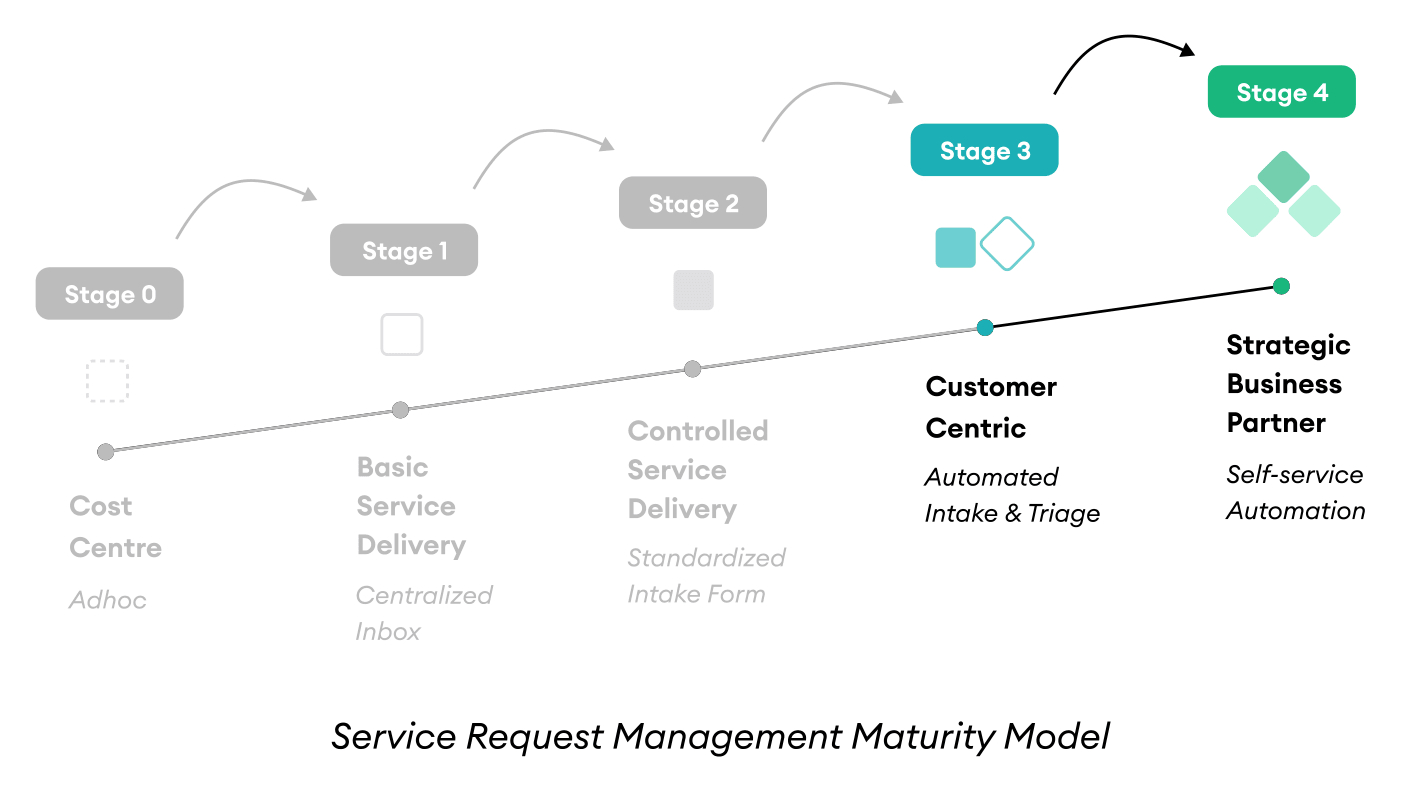
Moving from Stage 3 to Stage 4:
- Review low-risk and low-strategic value, recurring work and define your risk framework (e.g. monetary thresholds) to decide the types of work that requires lawyer attention vs work that can be addressed through self-service and automation
- Prepare your templates, knowledge base, and draft your process maps for self-service and automation workflows.
- Define your master set of metrics for automated workflow data.
- Extend your intake and triage system to direct to self-help automation tools in addition to the allocation of requests to lawyers and other existing resources.
- Integrate your workflows with the rest of your tech stack including document management, matter management etc.
- Establish a feedback and NPS system for business users to rate legal’s service delivery for continuous improvement.
Moving Forward
With unstructured legal requests consistently coming from the business, getting caught up in the intake & triage process can lunge legal teams further and further way from the work that really matters.
Building an effective intake & triage solution is thus a first crucial step to building legal functions for scale and becoming more strategic in focus.
As a no-code workflow automation platform, Checkbox is used by legal teams to build intake & triage systems that are configured to each organization’s specific needs, all without coding. Contact our team of legal technology experts to determine your current intake and triage needs, and help you visualize what an optimized service request process can look like for your company.


