If you work with an in-house legal team, you’ve probably noticed something: lawyers are busy, but not always with the work that actually needs a lawyer.
A huge chunk of what lands in a legal team’s inbox every week looks something like this: a standard contract that needs a quick review, a vendor agreement that follows the same format every time, or an NDA that’s practically identical to the last ten. Routine stuff. Predictable stuff. But it still gets handled manually, one email at a time, by people whose expertise is being quietly wasted on copy-paste work.
In fact, in most companies, around 40% to 60% of all incoming legal requests are repetitive. Same request types, same decisions, same outcomes — over and over again.
So why isn’t more of this automated?
Usually, it comes down to one fear: “What if we automate something we shouldn’t, and it creates a bigger problem than the one we solved?”
While I understand why one would be worried about such a thing, it’s important to be aware that this is based on the misconception that manual processes are the safe option. They’re not. They’re just the familiar option. And familiar doesn’t mean controlled. It often means inconsistent approvals, advice shared informally, and no real visibility into what’s moving through the team.
When automation is designed well, it actually does the opposite of what people fear. It makes the process more consistent, more trackable, and easier to manage.
This article breaks down exactly how to do that: how to identify what to automate, how to build in the right guardrails, and how to roll it out smoothly and safely.
Step 1: Define What “Low Risk” Actually Means
Before you automate anything, you need to answer one foundational question: what exactly are we comfortable putting on autopilot?
This sounds obvious, but most teams skip it. They jump straight to tools and workflows without first drawing a clear line between what should be automated and what shouldn’t. That’s where things go wrong.
Here’s the key distinction: low risk doesn’t mean low importance. It means predictable, bounded, and already decided.
Think about the requests your team handles on repeat where the outcome is almost never a surprise. These are typically mutual NDAs, vendor agreements under a certain dollar threshold, employment confirmation letters, standard procurement addendums, etc.
These are classified as ‘simple’ because your team has already worked out how to handle them, and the answer is almost always the same.
That’s your automation sweet spot.
A quick way to test whether something belongs there is to ask these four questions:
-
Is the language largely standardized?
-
Is the financial exposure limited or capped?
-
Is the decision tree stable and repeatable?
-
Does it rarely require real negotiation?
If the answer to most of those is yes, it’s a strong candidate. If even one answer is “it depends,” pause and dig into why before moving forward.
Remember: the goal of this step isn’t to build a perfect list on day one. It’s to give your team a shared, agreed-upon definition of what “low risk” means for your organization so that when automation decisions come up, you’re working from policy.
Step 2: Standardize Before You Automate
If three different lawyers on your team are using three slightly different NDA templates, and approval thresholds are applied based on whoever happens to pick up the request, automating that process won’t clean it up. It’ll just hard-code that inconsistency at scale.
This is why standardization has to come first, and it’s where legal ops can add enormous value.
Before building any workflow, get three things locked down:
-
One version of the truth on templates. Consolidate your documents into a single “gold standard” for each request type. Define what the approved fallback positions are. Document where the boundaries sit — what language is acceptable, what isn’t, and what triggers a conversation with senior counsel.
-
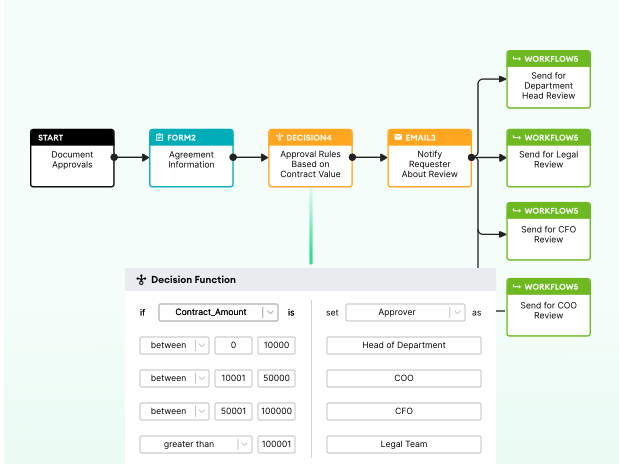
Clear approval thresholds. Who reviews what, and at what value? For example: contracts under $100K go to legal ops, $100K–$500K go to commercial counsel, above $500K escalate to senior leadership. Whatever the right numbers are for your organization, they need to be written down and agreed upon before automation can enforce them.
-
Documented decision logic. If a clause changes depending on jurisdiction, contract value, or counterparty type, that logic needs to be mapped out explicitly. Because automation can only do what you’ve told it to do — and if the rules live in someone’s head rather than on paper, they can’t be built into a workflow.
Step 3: Build Guardrails Into the Workflow
Guardrails are what make the difference between a workflow that runs on autopilot and one that runs responsibly on autopilot. They’re the boundaries you build into the system that define exactly how far automation can go and what happens when a request pushes up against those limits.
Here’s what that looks like in practice:
| Guardrail | What it does |
|---|---|
| Clause boundaries | No open-ended free-text edits. Users select from pre-approved clause variants, and the system inserts the right language automatically. If someone tries to go outside those options, the workflow stops. |
| Financial thresholds | If a contract value exceeds a defined amount, it automatically routes to the appropriate level of counsel — not whoever happens to be handling the request that day. |
| Jurisdictional rules | Data privacy, employment law, and other obligations vary by region. A well-built workflow adjusts the process automatically based on where the contract applies. |
| Red flags | Non-standard indemnity language, unusual liability clauses, high-risk counterparty — the workflow catches these and routes them for human review rather than letting them sail through unchecked. |
The design philosophy here is important: the system should be conservative by default. When in doubt, escalate. A workflow that occasionally sends something to a lawyer that didn’t strictly need review is far less costly than one that quietly approves something it shouldn’t have.
This is also the point where automation starts to look more controlled than the manual process it’s replacing. Email has no guardrails. A well-designed legal workflow does.
Step 4: Design Clear Escalation Paths
The goal of legal automation is to make sure lawyers are only in the process when they actually need to be. It handles the straightforward, predictable requests so that your legal team’s attention is reserved for the ones that genuinely require their judgment.
A useful rule of thumb: automate the 70%, escalate the 30%.
That 30% is the system working exactly as intended. Escalation is risk management functioning correctly. The requests that get flagged and routed to a lawyer are precisely the ones that should be.
For every request type you automate, you need to define the escalation path just as clearly as you define the automation itself. That means answering:
-
What specifically triggers a manual review?
-
Who receives the escalation, and how quickly do they need to respond?
-
Can a lawyer override an automated decision if needed?
-
How are exceptions logged and reported?
That last point matters more than it might seem as every escalation is a data point. Over time, patterns in your escalation log will tell you where your thresholds need adjusting, where templates need updating, and where new request types might be emerging that your current system isn’t built to handle.
One thing GCs consistently want to know before signing off on automation is simple: can we intervene if something goes wrong? The answer needs to be an unambiguous yes — with a clear, documented process for how that works.
Step 5: Maintain Visibility Through Reporting
One of the most common fears about automating legal processes is losing sight of what’s happening. When work moves through email, at least you can see it. When it moves through an automated workflow — where does it go? Who’s watching? This is actually where automation has one of its biggest advantages over manual processes, but it’s a benefit that only materializes if you build it in deliberately.
Email-based intake produces fragmented, unsearchable records. Automated workflows, when set up correctly, produce structured data. And structured data means reporting — real visibility into what’s moving through your legal team, in real time.
A useful legal dashboard for any legal ops team should be tracking the following legal metrics:
| Metric | Why it matters |
|---|---|
| Total automated requests | Understand overall volume and demand trends |
| % fully automated vs escalated | Your clearest signal that guardrails are working |
| Turnaround times | Demonstrate efficiency gains to the business |
| Red flags triggered | Spot patterns in where requests are pushing boundaries |
| Clause deviations | Identify where templates may need updating |
| Volume by business unit | See which teams are generating the most legal demand |
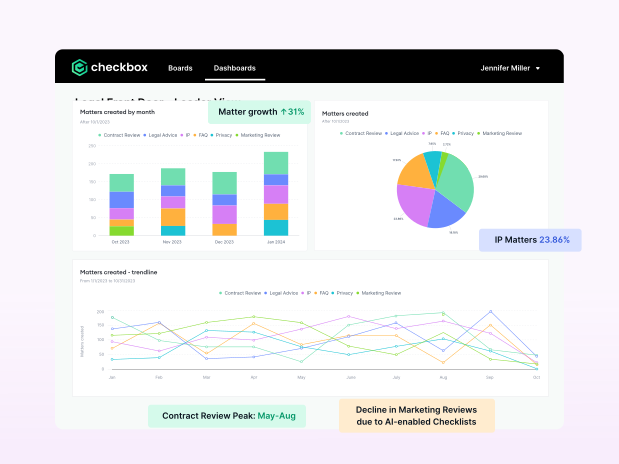
For GCs, this kind of reporting provides the ability to clearly articulate what the team is handling, how it’s being managed, and where the risks are sitting — at any given moment.
For legal ops, it’s the foundation for continuous improvement. You can’t optimize a process you can’t measure. So, done right, automation means seeing more than you ever could before.
Step 6: Start Small — A 90-Day Rollout Plan
One of the biggest reasons legal automation initiatives fail isn’t bad technology or lack of buy-in. It’s scope. Teams try to automate too much, too fast, and the whole thing collapses under its own weight.
The antidote is a controlled, phased rollout. Start narrow, prove the concept, then expand. Here’s what that looks like over 90 days:
Month 1: Identify and Design
Don’t touch any technology yet. This month is about laying the groundwork.
-
Audit your request volume and identify your top 2–3 most repetitive request types
-
Map out the decision tree for each one (every condition, every threshold, every escalation trigger)
-
Standardize your templates and get sign-off on approved language
-
Define your risk thresholds and document your escalation paths
If you can’t complete this step cleanly, you’re not ready to build yet.
Month 2: Build and Test
Now you build (…but you don’t launch).
-
Configure your workflows with all guardrails in place
-
Test internally, stress-test edge cases, and make sure escalation triggers are firing correctly
-
Pilot with a single business unit (not the whole organization)
-
Collect feedback and note what the system handles well and where it struggles
Resist the urge to expand before you’ve learned from the pilot.
Month 3: Monitor and Adjust
This is where the real work happens.
-
Track your escalation rates closely — are they where you expected?
-
Adjust thresholds where the data suggests they’re too tight or too loose
-
Refine clause logic based on what the pilot surfaced
-
Only once you’re confident in the results, begin a gradual broader rollout

A 90-day phased approach does something just as important as getting the technology right. It builds organizational confidence. Business teams see it working and legal teams see that control hasn’t been lost. And by the time you scale, you’re doing so on the back of real evidence, not just a promise.
Addressing Common Concerns
Even with a well-designed system and a careful rollout, you’ll likely encounter some resistance. Here are the most common concerns that come up — and how to address them.
”What if something slips through?”
This is the fear that drives most hesitation around legal automation, and it’s worth taking seriously. The honest answer is: with the right guardrails, the system is less likely to let something slip through than your current process is.
The key is starting conservative. Set escalation triggers tightly at first. When in doubt, route to a lawyer. As you build confidence in how the system performs, you can gradually widen the automation boundaries based on real data. An automated workflow with strict guardrails will catch more edge cases than an email chain that no one is systematically reviewing.
”Will the business just bypass the system?”
Only if the system is slower or harder to use than going directly to a lawyer. If your automated workflow genuinely reduces turnaround time (and it should) business teams will adopt it voluntarily because it gets them what they need faster.
That said, eliminating the informal side channels matters. If people can still email a lawyer directly and get a faster answer, they will. Making the workflow the default path, not just an option, is essential to making adoption stick.
”Are we creating overreliance on templates?”
Your team may already be using templates. The difference is that right now, they’re likely being applied inconsistently, stored in different places, and updated at different times by different people. Automation doesn’t create reliance on templates. It just enforces their consistent use, which is precisely what you want.
”Will this make our legal team look replaceable?”
Quite the opposite. Automation makes the strategic value of your legal team more visible, not less. When lawyers are freed from repetitive, low-value work, they show up more in the conversations that actually matter such as negotiations, risk advisory, growth initiatives. That’s not a team that looks replaceable. That’s a team that looks indispensable.
Key Metrics That Signal Success
Once your automation is up and running, you need to know whether it’s actually working. Not just whether requests are moving faster, but whether the system is performing consistently, safely, and in a way that’s genuinely shifting how your legal team spends its time.
These are the numbers worth tracking:
| Metric | What it tells you |
|---|---|
| % of requests automated end-to-end | How much of your routine volume the system is successfully handling without lawyer involvement |
| Escalation rate | Whether your guardrails are calibrated correctly — too low suggests the system is over-automating; too high suggests thresholds need loosening |
| Average turnaround time | How much faster requests are being resolved compared to your manual baseline |
| Email volume reduction | A practical signal of whether the business has genuinely adopted the workflow |
| Lawyer hours reallocated | The clearest measure of whether automation is delivering on its core promise of freeing up your legal team for higher-value work |
| Outside counsel spend | Whether reduced internal bottlenecks are translating into fewer matters being pushed to external lawyers |
One number deserves special attention: your escalation rate. It’s tempting to treat a high escalation rate as a sign that automation isn’t working. In reality, it’s one of your most important health indicators. A system that never escalates isn’t being conservative enough. A healthy escalation rate means your guardrails are doing exactly what they were designed to do.
The goal here is never 100% automation. It’s the right automation with the data to prove it.
Key Takeaways
When legal automation is implemented the right way, three things happen. Your lawyers get their time back for conversations that move the business forward, your legal function becomes more consistent and more defensible, and your leadership team finally gets visibility into what legal is handling, how it’s being managed, and where the risks are sitting.
But getting there requires more than good intentions. It requires the right technology, configured the right way, with the right guardrails built in from the start.
If you’re ready to explore what safe, practical automation could look like for your legal team, we’d love to help. Schedule a call with one of our legal technology consultants and let’s talk about where to start.