


Most in-house teams purchase tools to solve the most urgent problem at the moment budget becomes available. While that approach is reasonable for quick decisions, it often leads to a collection of tools that don’t work well together as a cohesive system.
A legal tech stack is the set of connected tools an in-house legal team uses to capture, manage, execute, and measure legal work. It typically includes five core categories: intake and triage, matter management, contract lifecycle management, self-service and knowledge, and reporting and spend. Vendors often describe these categories as “layers” because each one depends on data generated by the others. That interdependence is what turns a simple list of tools into an ordered sequence.
Most buyer’s guides help you choose between categories. This one focuses on what to buy first, and what each purchase depends on already being in place to work properly.
Why Most Legal Tech Stacks Are Built in the Wrong Order
Legal tech stacks are often built in the wrong order because teams prioritize the most visible pain instead of the most fundamental need. Daily contract review pressure leads to buying a CLM, and poor board-level reporting leads to buying a dashboard. However, both tools rely on having structured request data in place, and in many legal departments, that foundation does not exist.
Demand-side legal technology controls how work enters the legal team: who can submit requests, through which channels, what information must be provided, and how those requests are routed. Supply-side legal technology focuses on handling work after it has already entered the system, helping lawyers manage, process, and complete tasks in the queue.
A legal front door is a demand-side tool. By contrast, tools like CLM, matter management, e-billing, and analytics are supply-side as they all depend on the demand side being structured and organized first.
The Five Layers of an In-House Legal Tech Stack
An in-house legal tech stack is made up of five functional layers arranged in a specific order. The sequence matters because each layer depends on the data generated by the one below it.
- The first layer captures incoming demand.
- The second layer organizes and routes that work.
- The third layer generates documents and supports decision-making.
- The fourth layer enables users to get answers without involving a lawyer.
- The fifth layer measures performance across all layers.
Layer by layerThe Five Layers Of A Legal Tech StackWhat It DoesTypical ToolsDepends OnLayer 1Intake And AccessWhat It DoesCaptures legal requests from the business, collects the right information, and routes to the right person or workflowTypical ToolsLegal front door, intake and triage software, request trackingDepends OnNothing. This is the foundation.Layer 2Legal Work ManagementWhat It DoesHolds the record of every matter, assignment, status, deadline and documentTypical ToolsMatter management, legal project managementDepends OnStructured requests from layer 1Layer 3ExecutionWhat It DoesProduces the output: contracts, approvals, NDAs, policy sign-offs, signaturesTypical ToolsCLM, document automation, workflow automation, e-signatureDepends OnA defined request type and a triggered workflowLayer 4Knowledge And Self-ServiceWhat It DoesAnswers routine questions and generates routine documents without involving a lawyerTypical ToolsAI legal chatbot, policy knowledge base, self-service portalsDepends OnLayer 1 to intercept the question before it becomes a requestLayer 5Insight And SpendWhat It DoesReports on volume, cycle time, workload, cost and outside counsel spendTypical ToolsLegal analytics, dashboards, e-billing, spend managementDepends OnClean data from layers 1 and 2
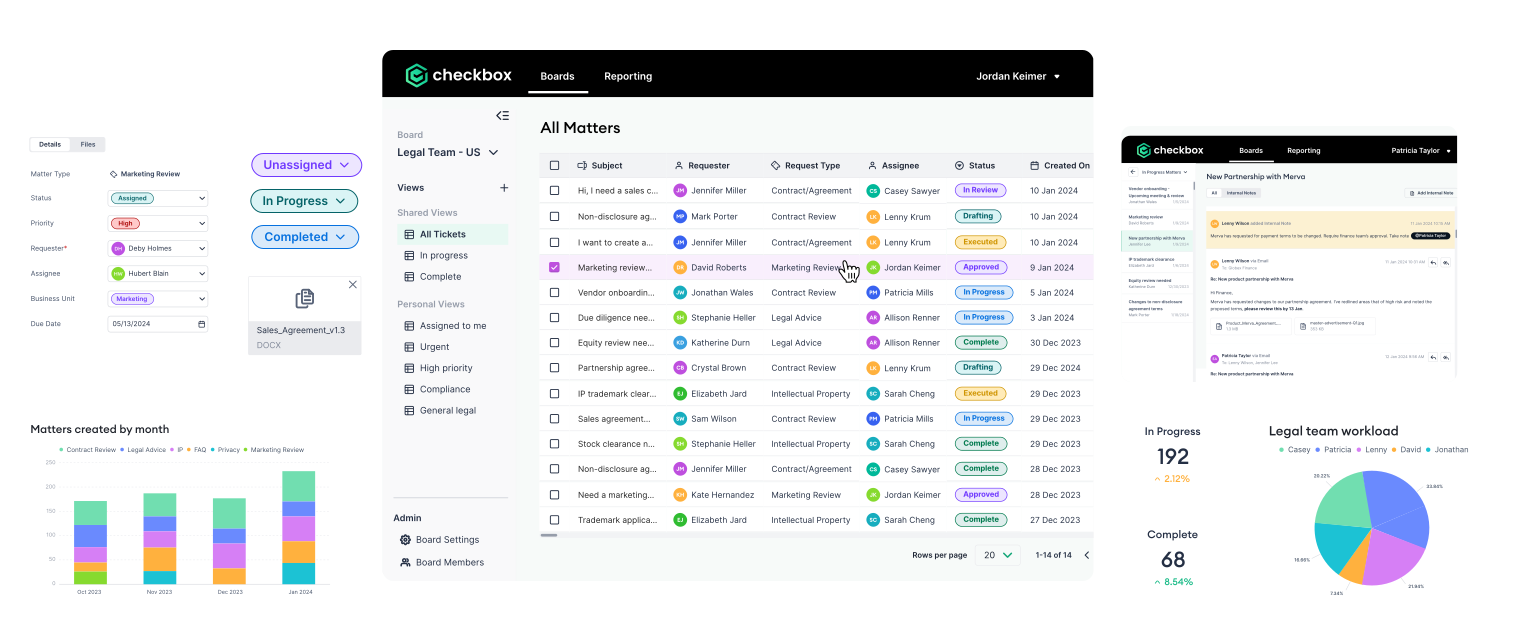
Two things that are important to note regarding this model are that 1) AI is not a layer, and 2) small teams do not always need various separate purchases. Legal AI is a property that any of these layers can have. For instance, an AI drafting assistant sitting in layer three and an AI legal front door sitting in layer one solve completely different problems. Moreover, in a lean team of three, layers one, two, and four can often be managed within a single platform or through modules from the same vendor. For example, Checkbox provides a legal front door, matter management, and a self-service chatbot as modular features that integrate seamlessly. This approach lets you adopt only what you need, scale over time, and avoid being locked into a single, rigid system.
What Legal Tech Should a Small Legal Team Buy First?
For a small legal team (1–3 people), start by investing in a legal intake system along with document automation for your highest-volume templates. Together, these tools handle most incoming requests and generate the structured data needed for any future tools.
This is because, in a three-person team, the main constraint is the high volume of simple requests coming in through multiple channels, often with missing information. Each legal request typically requires a follow-up conversation before any work can begin. Legal intake and triage software, or an AI-powered legal front door, reduces this delay by asking the requester the right questions upfront and automatically routing those requests based on the answers.

What a Three-Person Legal Team Should Buy
- Intake and triage with a legal front door. A legal front door that integrates directly into the tools your teams already use ensures requests are captured and triaged efficiently. It helps small legal teams reduce ad hoc emails and missed requests, since standalone intake portals are often bypassed.
- Document automation for your top 3-5 templates. NDAs, standard MSAs, DPAs, and consultancy agreements typically make up a large share of total volume. Because these documents are relatively standardized, they are well-suited to being generated from simple, form-based inputs.
- E-signature. Streamlines signing and neatly completes the workflow started by the templates above.
What a Three-Person Legal Team Should Skip
- Contract lifecycle management (CLM) software. At this scale, a full contract lifecycle platform includes repository and negotiation features that you’re unlikely to need or use.
- E-billing and spend management. Below a certain outside counsel spend, a basic spreadsheet combined with an invoice approval workflow is often sufficient.
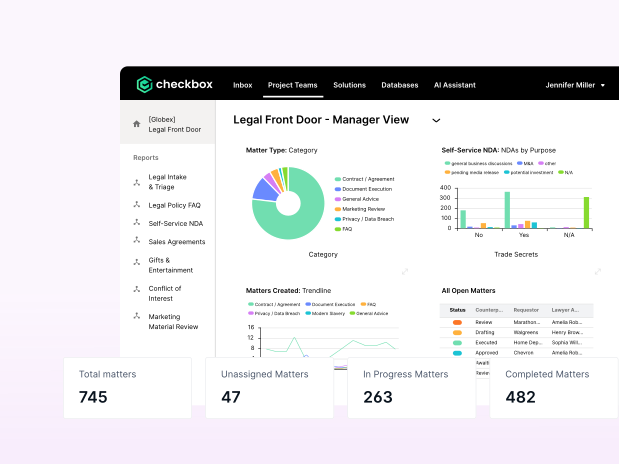
- Standalone analytics. Your intake tool should automatically provide key metrics like volume, cycle time, and workload. Investing in a separate reporting layer before you have meaningful data is one of the most common ways to waste budget.
- A general enterprise AI subscription. Useful for drafting and summarizing content, but it does not change how legal work is assigned or delivered to the team.
What Tools to Add at a Ten-Person Legal Team
At around ten people, corporate legal teams should introduce a structured work management system and a legal self-service layer. This should become a priority when there’s a lack of visibility into what the team is working on, and when routine questions start to arrive faster than lawyers can handle them one by one.
Matter management software keeps assignment, status, deadlines, and documents organized and accessible in a single dashboard. As opposed to spreadsheets where lawyers must enter data in manually, each legal matter that sits in a matter management dashboard is created automatically when a legal request comes in.
Adding a self-service layer, or AI legal chatbot, becomes valuable when you can clearly identify the five most common business questions and none of them require legal judgment. For example: Can I sign this? Do I need approval for this discount? Is our standard NDA acceptable here? Which entity should this contract sit under? What is our data retention period?
These are repeatable questions with documented answers. Instead of sending each one to legal and waiting in a queue, a self-service platform, AI legal chatbot, or knowledge assistant can provide immediate, consistent answers at the moment they are needed.
Other legal operations tools worth adding at this stage:
- Reporting and analytics tools. By ten people you have enough work volume for metrics like cycle time and workload distribution to show meaningful patterns.
- Workflow automation for approval chains. Conflicts checks, gift and hospitality approvals, marketing reviews, and policy exceptions follow clear, repeatable steps, making them ideal candidates for automation and helping the team stay efficient without relying on inbox-based coordination.
- CLM (only if contracts dominate). If more than roughly two thirds of your volume is contract work and you are managing renewals and obligations at scale, a CLM can move up the queue.
What Tools to Add at a Legal Team of 30+ Employees
At 30 or more people, the focus shifts to specialization and managing costs. The main challenge is no longer choosing new tools, but making existing ones work well together. Most teams at this size already use multiple tools, so the biggest gains usually come from integrating and streamlining what they have rather than adding more.
The legal tech modules to add at 30 people:
- Contract lifecycle management (CLM) software. At this scale, features like obligation tracking, renewal management, and clause-level reporting become essential operational tools rather than “nice to have” capabilities.
- Spend management and e-billing. Once outside counsel spend runs to seven figures, managing rates, monitoring budgets, and auditing invoices can generate savings that exceed the cost of the tools.
- Legal analytics software as its own layer. Questions will likely start to outgrow a basic dashboard bundled with an intake tool, and you will need capabilities like demand forecasting, workload modeling, and cost-per-matter analysis.
- Specialist tools for whatever your risk profile demands. Entity management, privacy and DSAR handling, litigation hold, IP portfolio management, compliance training. These are driven by your industry rather than your size.
The main risk at this stage is tool sprawl. As departments grow through reorganizations, acquisitions, and individual preferences, they often end up with multiple systems all claiming to manage the same matter record.
The Most Expensive Legal Tech Buying Mistakes to Avoid
1. Buying a CLM as The First Purchase
The most common and most costly mistake is getting the sequence wrong. A CLM is designed to receive a clean, complete, and well-categorized contract request. Without a legal front door, legal teams have to manually create that request inside the CLM on behalf of the business. In practice, this means you’ve spent six figures to automate only the second half of the process, while still handling the first half manually. If you already have a CLM in this situation, the solution isn’t to replace it. It’s to add an intake layer in front of it.
2. Buying Legal Analytics Before You Have Structured Data
Legal dashboards report what they are given. If they sit on top of messy or unstructured intake, they produce polished-looking charts that represent only the work that happened to be recorded. That partial view can be more misleading than having no reporting at all, especially when it is shown to the board. That being said, both legal reporting and analytics rely on requests being captured correctly from the start.
3. Treating an Enterprise AI Subscription as a Legal Tech Strategy
A general-purpose AI assistant helps individual lawyers draft and summarize faster. However, it does not change how work arrives, who owns it, how it is prioritized or what it costs, and it produces no record of any of that. Where AI genuinely helps intake and triage is a narrower and more useful question than whether to have AI at all.
4. Asking the Business to Log Requests in Your System of Record
Matter management systems are designed for lawyers, not for salespeople who just need to request an NDA. When business teams are forced to create their own matters, the quality of submissions declines, adoption suffers, and the legal team gets blamed for the tool. Instead, keep the business-facing interface separate from the legal system, and have it feed information into the matter management platform.
5. Choosing on Feature Depth Instead of Configuration Speed
Feature comparison spreadsheets tend to favor platforms with the longest list of capabilities, but that rarely predicts whether your team can get the system up and running within six weeks. A better approach is to ask practical questions: Who can configure a new request type? How long does it take? Does it require the vendor’s professional services team? A no-code legal automation tool that your legal ops lead can adjust in a few minutes will often deliver more value than a more powerful platform that depends on a slow change request process. In practice, the most important criteria for a legal tool is how well it fits your workflows and how easily it can be configured.
6. Renewing Legal Tech by Inertia
Tech stacks grow over time because it’s easier to renew tools than to cancel them. Once a year, review every tool: note what layer it serves, how much it costs annually, and how often you actually use it. Tools that overlap in function and see little use should be cut and reallocated to budget for your next purchase.
In-House Legal Technology: Buying Guide Overview
Layer 1Intake and AccessAI Legal Front DoorBuy triggerMore than a third of requests arrive by direct message or email, or you cannot say how many requests you received last monthSkip untilNever. This is foundational.OwnerLegal ops or GCSuccess metricPercentage of requests captured through the legal front doorLayer 2Legal Work ManagementMatter Management SoftwareBuy triggerWork is being duplicated or dropped between owners, or someone is maintaining a tracking spreadsheetSkip untilIntake is structured and captures the majority of incoming legal requestsOwnerLegal opsSuccess metricAverage cycle time by request typeLayer 3ExecutionNo-Code Process Automation SoftwareBuy triggerYour top templates are stable and requested repeatedly, or contract volume dominates your workloadSkip untilYou can name and count your top request typesOwnerLegal opsSuccess metricPercentage of documents self-served or auto-generatedLayer 4Knowledge and Self-ServiceAI Legal Self-Service ChatbotBuy triggerYou can name the five most frequent questions and none need legal judgmentSkip untilYou have the question data to know what to automateOwnerLegal opsSuccess metricRequests deflected before reaching a lawyerLayer 5Insight and SpendLegal Analytics and Reporting DashboardBuy triggerOutside counsel spend is material, or you are asked to justify headcountSkip untilIntake and matter management are producing reliable dataOwnerLegal ops, with financeSuccess metricCost per matter, spend against budget
Key Takeaways
The sequence in which you adopt legal technology matters more than the specific tools you choose. That is because every system built on top depends on the data generated at intake. This dependency drives most of the recommended order.
Start with legal intake and document automation when your team reaches about three people. At around ten people, add matter management and self-service tools. When you grow to a team of thirty or more, you can consider investing in CLM, spend management, or dedicated legal analytics tools.
Along the way, decide which system owns each type of data. Connect your tools at the point of intake so downstream platforms receive structured data. Be especially cautious of adding analytics on top of unstructured intake. It can generate polished, confident-looking reports that may be misleading, yet still get presented to leadership as if they are fully accurate.
Want to see what the intake layer looks like in practice before you commit budget to it? Book a demo today and one of our technology consultants will walk through where a legal front door fits alongside the tools you already own.


