Most in-house legal teams don’t lack a way to receive requests — they have too many. Contract questions arrive by email, policy queries come through Slack, sales managers add rows to shared trackers, and colleagues leave comments in Word documents asking legal to “take a look.” Each is a request for legal assistance, but they are scattered across different tools with no single source of truth.
The result is work that’s hard to see and easy to lose. Lawyers search inboxes to find what was asked, the same request arrives twice through different channels and the general counsel can’t say how much work the team handled last month. Reliable legal front door software fixes this by capturing requests where they start, turning each one into a single structured record, routing it by rules legal owns and keeping a full audit trail.
This article explains where scattered requests come from, what reliability actually means when you evaluate an AI legal front door and how to move the business onto one without disrupting how people work.
Where Scattered Requests Come From
Requests scatter because the business uses many tools, and legal is reachable through all of them. Each channel loses something different.
| Channel | How Requests Arrive | What Gets Lost |
|---|---|---|
| Direct messages to lawyers, shared legal inboxes, long forwarded chains | Ownership, deadlines and which attachment is current | |
| Slack and Teams | Quick questions in channels or direct messages | Context, follow-up and any record once the thread scrolls away |
| Shared documents and trackers | Rows in spreadsheets, comments in shared Word or Google Docs, files dropped in shared folders | Status, history and who is responsible |
| Salesforce and Jira | Deal desk and project tickets that need legal input | Visibility for legal outside the business system |
| Meetings and calls | Verbal asks with no written trail | Everything, unless someone writes it down |
Shared documents and spreadsheet trackers are often the hardest to fix. A tracker feels organized, but it depends on people updating it, it rarely records who changed what and it can’t route anything. Comments on shared files are worse, because legal may never be notified at all.
What Reliable Means for Legal Front Door Software
Many tools can collect a request. Reliability is whether the front door captures every request consistently, keeps one accurate record and stands up to the scrutiny legal work requires. Use these six tests.
1. It Captures Every Channel Consistently
Requests should be accepted from email, Slack, Teams, forms and the business systems people already use, and every request should end up with the same core fields regardless of source. If email requests arrive complete but Slack requests arrive as a single line of text, the front door hasn’t solved the problem.
2. It Keeps One Record Per Request
Follow-ups, attachments and replies should attach to the original request instead of creating new ones. A reliable front door links emails, documents, tasks and conversations to one tracked matter, so the team searches one place.
3. Legal Owns the Rules
Routing, escalation and self-service should follow rules legal sets and can change without waiting on IT. If AI classifies or answers requests, it should work from legal’s approved content and thresholds, and route anything outside them to a lawyer.
4. Every Action Leaves an Audit Trail
You should be able to see what was asked, who handled it, what was decided and when. Permissions should control who can see sensitive matters, such as employment or disputes.
5. The Vendor Can Show Security Evidence
Legal requests contain confidential and sometimes privileged information. Ask for independent attestations, such as a SOC 2 Type II report and ISO/IEC 27001 certification, and for details on encryption and access controls.
6. People Actually Use It
A front door is only reliable if requests go through it. If employees have to learn a new portal, many will keep emailing lawyers directly. The best front doors are intake systems the business wants to use. Test whether the tool works inside the channels people already use.
How a Legal Front Door Reduces Scatter in Each Channel
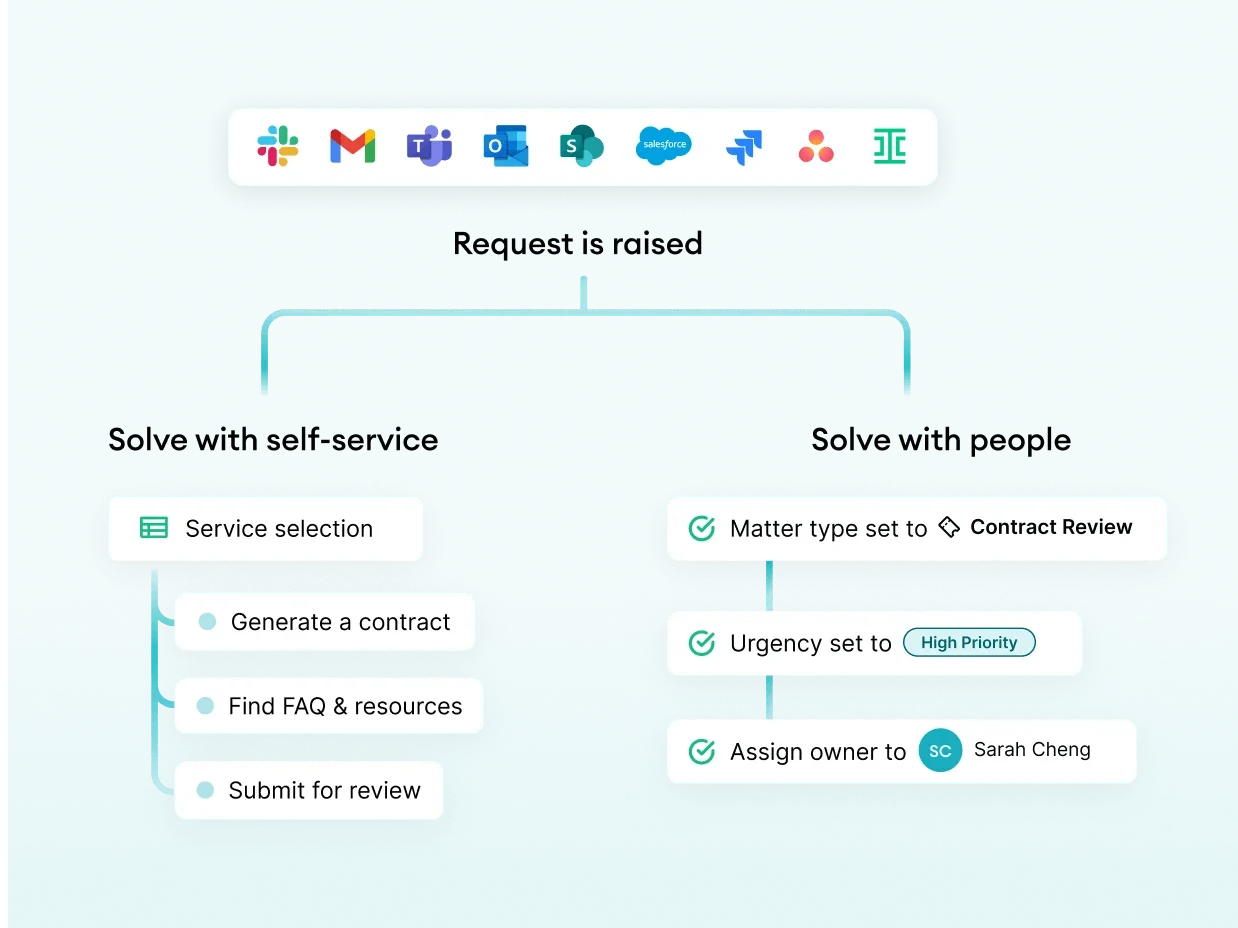
The agentic legal front door monitors a shared legal inbox or connects to Gmail and Outlook. Each new email becomes a legal matter stored in a central matter management dashboard with the requester name, request type, related files, and conversations attached. Replies stay with the same matter, so a long chain no longer means a lost request.
Slack and Teams
Employees ask their question where they already work. The AI legal front door captures and understands the message, asks for missing details if required, answers routine questions from approved content, and creates a matter in the central matter management dashboard for anything that needs a lawyer. The request no longer disappears when the thread scrolls away.
Shared Documents and Trackers
Replace the shared tracker with matter records that have statuses, owners and deadlines. Keep documents in your repository, such as SharePoint or Google Drive, and link them to the matter instead of circulating copies. Ask the business to raise review requests through the front door instead of leaving comments on shared files.
Salesforce and Jira
Legal requests that start in a CRM or project tool are captured into the same legal queue, with key details carried across. Legal gets visibility without asking sales or product teams to change systems.
How Checkbox Approaches Scattered Requests
Checkbox’s AI legal front door software captures requests from email, Slack, Teams, Jira, Salesforce and forms into a single platform. It creates matters automatically with details such as type, requester and assignee, and uses intelligent triage to route each request to the right workflow, process or person. Routine requests can be resolved through legal self-service, while the legal team sets the rules for what gets automated and what reaches a lawyer.
Behind the front door, Checkbox links matters, documents, emails, tasks, approvals and conversations, with linked inboxes, custom statuses, fields and boards, and configurable views. Reporting shows request volume, status, type and workload, so legal can see demand instead of estimating it. Checkbox integrates with Gmail and Outlook, Slack, Microsoft Teams, Salesforce, Ironclad and Ivo, and can connect to document repositories such as SharePoint and Google Drive.
On reliability, Checkbox has completed a SOC 2 Type II examination, holds ISO/IEC 27001:2022 certification and has been audited as compliant with ISO/IEC 27017:2015 and ISO/IEC 27018:2019. Data is encrypted at rest and in transit. Details are on the Checkbox security and trust page.
How to Move Off Scattered Channels Without Disrupting the Business
- Audit your current channels. Use the one-week audit above to see where demand comes from.
- Start with your highest-volume request types. NDAs, contract reviews and policy questions are common starting points.
- Connect the channels people already use. Integrations matter more than features here. Start with email and your main chat tool before adding forms.
- Retire the shared tracker. Move open items into the front door and make the old tracker read-only.
- Give the business one simple message. For example, “Ask legal in Slack or email legal@ as usual. It’s now tracked.”
- Review the data after a month. Check which requests still arrive outside the front door and close those gaps.
Signs Your Legal Front Door Is Working
Track a few legal-specific metrics to capture ROI more effectively, as opposed to broad estimates:
- Capture rate: the share of requests that arrive through the front door rather than direct messages or shared files.
- Demand by type: how many requests of each kind legal receives each month.
- Turnaround: how long requests take from submission to completion, by type.
- Backlog: how many open requests are waiting, and for how long.
- Workload: how requests are distributed across the team.
If capture rate rises and backlog becomes visible, the scatter is shrinking.
Key Takeaways
Scattered requests come from email, chat, shared trackers, document comments and business systems, and each channel loses ownership, context or history. Reliable agentic legal front door software captures every channel consistently, keeps one record per request, follows rules legal owns, leaves a full audit trail, has independent security evidence and fits the tools people already use. Checkbox brings requests from email, Slack, Teams, Salesforce and forms into one governed process, with SOC 2 Type II attestation and ISO/IEC 27001 certification. If you’d like to see how Checkbox could pull your scattered requests into one front door, schedule a call with a Checkbox legal technology consultant.
Frequently Asked Questions
What Is a Legal Front Door?
A legal front door is a single entry point for legal requests. It captures requests from the channels the business uses, structures them and routes them to self-service or the right lawyer.
Why Do Legal Requests Get Scattered?
The business contacts legal through email, chat, shared documents and business systems. Without one intake process, each channel holds part of the work and nothing is tracked consistently.
What Makes Legal Front Door Software Reliable?
Consistent capture across channels, one record per request, rules legal controls, audit trails, independent security evidence and high adoption by the business.
Can a Legal Front Door Replace Shared Request Trackers?
Yes. Matter records with statuses, owners and deadlines replace manual trackers, and old trackers can be kept read-only for reference.
Does Checkbox Work With Slack and Microsoft Teams?
Yes. Checkbox captures requests from Slack and Microsoft Teams, along with email, Jira, Salesforce and forms.
Is Checkbox Secure Enough for Legal Requests?
Checkbox has a SOC 2 Type II attestation and ISO/IEC 27001:2022 certification, and encrypts data at rest and in transit. Security documents are available on request.