Corporate legal departments automate matter intake by replacing scattered emails, chat pings, and ad hoc forms with a single structured entry point (also known as a legal front door) that captures every request with the right information, triages it by priority and risk, and routes it to the right person, workflow, or system. The goal is to remove the friction that sits between the business asking for legal support and legal actually starting the work.
The rest of this piece breaks down what that looks like in practice, the features that make it work, and the mistakes teams tend to make when they build it themselves.
What Matter Intake Automation Actually Means
Matter intake automation is the process of standardizing how legal requests enter the department. Instead of a lawyer receiving a vague Slack message asking to “review this contract” and then chasing down the counterparty details, contract type, business context, and deadline, an automated intake system asks those questions upfront, at the moment the request is made.
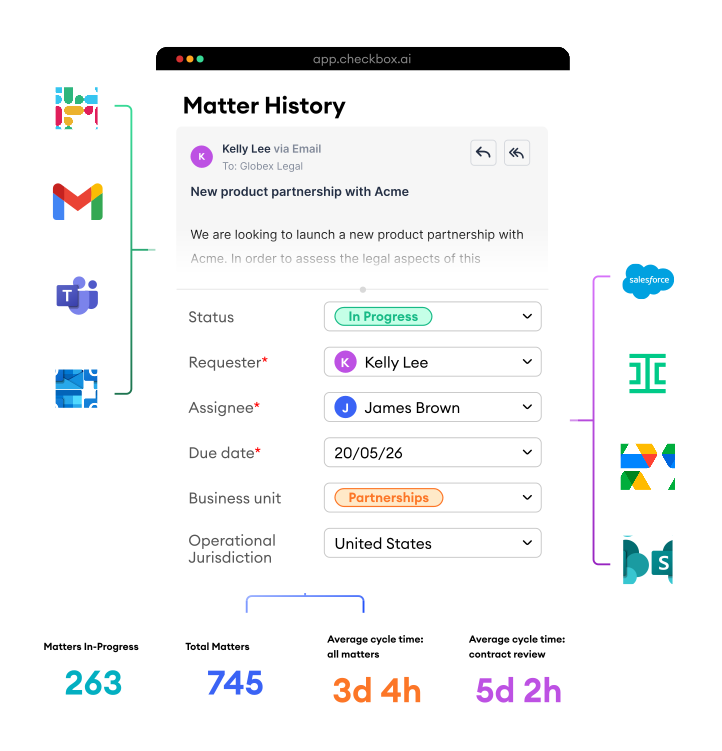
The system does three things. It captures the request with the right context attached (requester, business unit, matter type, urgency, supporting documents). It applies rules to classify and prioritize the request. And it routes the work to the correct stakeholder, template, or downstream tool.
When done well, the business user does not feel like they are filling out a form. They should be able to interact with legal the way they normally would, through Teams, Slack, or email, while the system does the structuring behind the scenes.
How to Automate Matter Intake: 5 Steps
Most corporate legal departments follow a similar sequence when moving from manual to automated intake.
1. Map Current Request Patterns
Look at the last 90 days of legal requests and group them by type. Contract review, employment questions, marketing sign-off, data privacy queries, and vendor onboarding usually make up the bulk. Understanding volume by category tells you where automation will have the highest impact.

2. Standardize the Fields for Each Request Type
Every legal matter type needs a defined set of intake fields. A contract review request needs counterparty name, contract type, value, and deadline. An employment question needs jurisdiction and employee status. Standardizing these at the beginning prevents back-and-forth later.

3. Build Routing and Triage Logic
Decide who or what handles each request based on type, value, jurisdiction, or risk level. For instance, a low-value NDA might route straight to a legal self-serve process. Whereas, a high-value commercial agreement should route to a senior lawyer with the relevant playbook attached.

4. Integrate with Existing Channels
Business users may be resistant to adopting a new portal. Intake needs to work inside the tools they already use, which usually means Microsoft Teams, Slack, and email. The automation runs in the background.
.svg)
5. Connect Intake to Downstream Systems
Once a matter is captured and triaged, it should flow into the tools legal already uses, whether that is a CLM platform, a matter management system (MMS), a workflow builder, or a reporting dashboard.
Features to Look for in a Matter Intake Platform
Not every intake tool is built for the volume and complexity of in-house legal work. The features that separate a functional platform from a workaround include:
- Conditional logic so questions adapt based on prior answers and the requester only sees what is relevant.
- Native integration with Teams, Slack, and email, so business users engage where they already work.
- Automated triage and routing rules that remove manual sorting from legal ops.
- Configurable workflows that legal ops can update without a developer.
- Reporting and analytics that capture volume, response time, and matter type data automatically for KPI tracking.
- Integration with CLM, DMS, and workflow tools so intake feeds cleanly into the rest of the stack.
In-house legal AI software vendors like Checkbox refer to this structured entry point as the legal front door, and it sits at the base/foundation of the wider legal tech stack. Without a functioning intake layer, contract lifecycle management, workflow automation, and analytics tools cannot operate on clean, complete data.
Benefits of Automating Matter Intake
Legal teams that automate intake typically see improvements in four areas. Response times drop as requests are triaged and routed without human handling. Matter data becomes cleaner, which makes reporting, forecasting, and workload management possible for the first time. Legal ops stops acting as a manual traffic controller. And business users get clearer expectations, status visibility, and consistent responses.
Directional data from industry surveys, including the ACC CLO Survey and Bloomberg Law Legal Operations reports, consistently point to legal intake and triage as one of the highest-impact areas for automation in corporate legal.
Common Pitfalls to Avoid
Three mistakes often arise when legal departments try to automate intake.
- Forcing users into a portal → Adoption drops fast when business users have to leave their normal tools.
- Over-engineering the form → Long, complex intake forms create as much friction as they remove.
- Skipping the routing logic → Capturing requests without automated triage just moves the bottleneck one step down the line.
Key Takeaways
Automating matter intake starts with mapping current request patterns, standardizing fields, and building triage logic that routes work to the right destination. The platform should meet business users where they already work, integrate with the rest of the legal tech stack, and give legal ops the ability to iterate without engineering support.
For corporate legal teams looking to see this in action, book a demo to explore how legal front door software structures matter intake at scale.