Without the right contract metrics, it's hard for legal teams to explain where agreements slow down or what needs attention. Overall turnaround time might improve, while finance approvals still hold up deals and renewal deadlines are missed.
Tracking the right measures gives legal operations a clearer view of the contract process. It helps the team set realistic expectations with the business, address recurring delays, and make renewal decisions before deadlines pass.
So, what contract metrics should legal operations track on a dashboard? Start with cycle time by stage, approval delay, redline rate, fallback-clause use, renewal exposure, bottlenecks, and data-quality checks. Here's what each metric tells you and how it can support better decisions.
1. Contract Cycle Time by Stage
Contract cycle time shows how long it takes to move an agreement from a complete, accepted request to final signature. Breaking it down by stage helps legal understand where that time is spent, whether in drafting, legal review, negotiation, or signature.
This gives the business a more useful answer than one overall turnaround figure. If negotiation takes longer than legal review, for example, the team can focus on recurring points of disagreement rather than assuming legal needs more reviewers.
If a contract returns to a stage, add its completed visits to measure total time in that stage for that agreement.
Useful stage definitions include:
| Stage | Start Event | End Event |
|---|---|---|
| Intake | Contract request submitted | Complete request accepted for work |
| Drafting | Complete request accepted for drafting | First draft ready for review |
| Legal review | Version assigned for legal review | Legal review completed or version returned for revision |
| Negotiation | First version sent to the counterparty | Final wording agreed by both parties |
| Signature | Agreed version released for signature | All required signatures completed |
For completed agreements, show the median, or typical turnaround time, alongside the 90th percentile, the time within which 90% of the measured agreements finished. Include the number of agreements in the comparison and each agreement's total time in each stage. Agreements still in progress need their own age measure, so stalled work doesn't disappear from view.
Cycle time includes waiting; it doesn't measure the hours lawyers spend working. If the overall measure starts when a complete request is accepted, show the earlier intake period separately. Some stages can overlap, so adding their median times together won't give you the overall cycle time.
Legal operations owns the metric definitions and reporting. When a stage takes longer, its owner can look into the cause, such as missing intake information, repeated drafting changes, or slow counterparty responses. Over time, this helps the team set clearer expectations and focus improvements on the part of the process that needs them.
2. Approval Delay
Contracts often need input from finance, security, or other business teams before they can move forward. Approval delay shows how long each decision takes once the approver receives a complete request.
Tracking this separately helps legal distinguish approval delays from time spent drafting or negotiating. It also shows where a missing decision is holding up an otherwise ready agreement.
Report the median and 90th percentile by approval function, such as finance, security, or legal.
For pending approvals, use a separate measure:
Treat a fresh approval after material revisions as a new round, so the earlier decision remains visible. If finance and security review at the same time, their approval periods overlap. Adding those periods together would overstate how long the agreement waited.
The approval process owner can use this metric to follow up on older requests and understand what's missing. That might mean providing more context, arranging a delegate, or reviewing an unnecessary approval step within company policy. The number starts that conversation; it doesn't explain the cause on its own.
3. Redline Rate
Redline rate shows how often counterparties request substantive changes to an agreement. It helps legal see which templates and clauses create the most negotiation work.
When the same clause is edited repeatedly, the team has a specific issue to review. The wording may need clarification, or the playbook may need better guidance for a recurring commercial request.
Base the rate on negotiations completed during the reporting period, including agreements accepted without edits. Only include agreements whose redline status is known.
Count each agreement once, even if it has several marked-up versions. Agree whether minor administrative edits, such as correcting an address, count as redlines. A blank field means the status is unknown, rather than that the agreement had no edits.
For clause-level detail, use:
Compare similar agreement types and separate contracts using your template from those using the counterparty's. More redlines can reflect a more complex transaction, so a high rate doesn't automatically mean the template or legal team is underperforming.
The template or playbook owner can review recurring edits and decide whether clearer wording, updated negotiation guidance, or an approved alternative would help. This gives the team a practical way to address repeat negotiation work.
4. Fallback-Clause Use
A fallback clause is a pre-approved alternative that legal can use when the preferred wording isn't accepted. Tracking how often those alternatives appear in signed agreements shows which playbook positions the team actually relies on.
This can reveal a gap between the preferred position and what counterparties regularly accept. It also helps legal distinguish routine, approved negotiation choices from changes that need additional review.
Look at each clause and agreement type separately. For example, if ten of forty signed agreements in which liability was negotiated use an approved liability fallback, the rate is 25%. These figures illustrate the calculation; they aren't a benchmark.
Count the wording adopted in the signed agreement, rather than every fallback offered during negotiation. Keep unapproved changes separate. Using an approved fallback within the playbook's rules isn't a policy breach.
The playbook owner can use recurring fallback patterns to review whether the preferred position still fits the business's transactions. The next step might be clearer guidance on when to use an alternative or a proposed playbook change for approval.
5. Renewal Exposure
Renewal exposure shows which active agreements need a decision or action before an approaching deadline. It helps the business avoid discovering too late that it needed to give notice before a contract renewed.
The important date is often the notice deadline, rather than the renewal date itself. Keeping both visible gives contract owners time to review the agreement and decide whether to renew, renegotiate, or end it.
Show agreements needing attention within 30, 60, and 90 days, with overdue actions listed separately. If the 90-day count includes the 30- and 60-day counts, don't add them together.
Contract value can help owners prioritize these decisions, but it isn't the amount the business is expected to lose. Keep customer revenue separate from supplier spend, and explain which period and currency the value covers.
For a simple fixed-date clause, the notice deadline may be the renewal date minus the required notice period. The actual wording still needs checking, including how notice must be delivered and how dates are calculated.
Each agreement needs a named business owner who can make the renewal decision and ensure the required action happens. Procurement or the account team handles the commercial review, with legal confirming notice requirements where needed. Showing the owner, deadline, and next action helps turn an upcoming date into a timely decision.
6. Contract Bottlenecks
Completed cycle times show where earlier agreements slowed down. Bottleneck measures show where contracts are waiting now, so the team can act before those delays grow.
A bottleneck may appear as a growing queue in legal review, unanswered approval requests, or agreements waiting on the counterparty. The dashboard should show how many contracts are waiting and how long they've been there.
Use three related measures for each stage:
Show the size of the queue alongside its median and 90th-percentile age. A busy queue can simply reflect high demand. When it keeps growing and older contracts aren't moving, the team has a clearer reason to investigate. Where the data allows, distinguish agreements waiting on legal from those waiting on business input or the counterparty.
The owner of that stage can review the oldest agreements and what's holding them up. That might mean reallocating work, obtaining missing information, or following up on a decision. Turnaround targets should reflect the agreement's type and complexity, so routine NDAs aren't judged against the same expectations as complex commercial deals.
7. Contract Data-Quality Checks
A contract dashboard is only useful if the information behind it is reliable. Missing dates can make turnaround look faster than it was. An agreement marked complete without a signed copy can create a false impression that the work is finished.
Data-quality checks help legal spot those gaps before using the dashboard to explain performance or make a business decision. The following checks show what needs correcting and who owns the follow-up.
| Check | Formula | Owner and Action |
|---|---|---|
| Required-field completeness | Legal operations follows up on missing agreement type, owner, or status fields. | |
| Invalid timestamp rate | Workflow or system owner investigates missing events and exit dates earlier than entry dates. | |
| Duplicate-record rate | System administrator reconciles duplicate IDs without merging distinct amendments or related agreements. | |
| Intake-to-contract link coverage | Integration owner investigates missing or mismatched links. | |
| Verified renewal-date coverage | Contract owner confirms dates against the executed agreement. | |
| Execution-evidence coverage | Contract administrator corrects unsupported completed statuses or attaches the signed agreement. |
A filled-in field isn't always an accurate one. Renewal dates and signature status still need checking against the signed agreement. The dashboard should also show when it was refreshed and how many records were checked, so readers know what they're looking at. If a calculation has no records to count, show the percentage as unavailable rather than treating it as zero.
These checks give legal operations and the relevant system owners a clear list of corrections. They also help the team explain when a result is incomplete, rather than presenting it as a reliable picture of performance.
Sample Contract Dashboard Layout
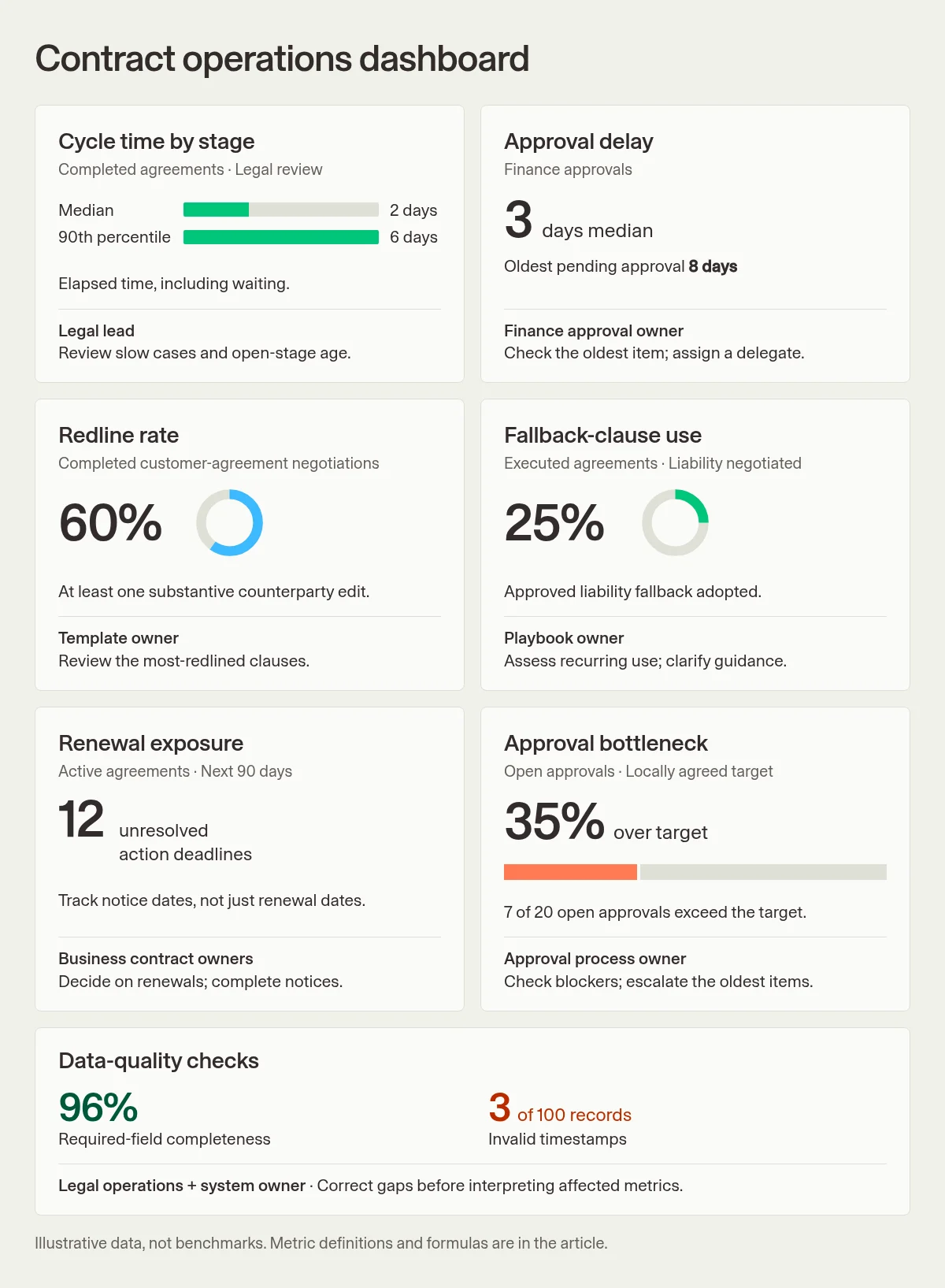
This sample brings the seven metric groups together, with an owner and next action for each. The figures are illustrative, not customer results or benchmarks. It shows a possible dashboard layout, rather than a Checkbox product screenshot.
The information behind these metrics may sit in more than one system. Checkbox supports structured legal intake and request reporting, helping legal see what work is coming in, who owns it, and its status. Details such as redline history, the fallback wording in a signed agreement, and renewal provisions may need to come from a specialist CLM or contract repository.
For more on those capabilities, see the guide to contract lifecycle management software features. The legal department KPI guide covers metrics beyond the contract process.
Key Takeaways
Tracking the right contract metrics helps legal explain where agreements slow down and what the business can do about it. Cycle time and approval delay show where time is spent. Redlines and fallback-clause use reveal recurring negotiation issues, while renewal exposure and bottleneck measures highlight work that needs attention now. Reliable data and a named owner make those insights useful in practice. Checkbox can help bring structure to the requests entering legal and make that work easier to report on, with specialist contract systems supplying deeper agreement data where needed. To explore how intake and reporting can support your contract process, schedule a call with a Checkbox legal technology consultant.
Frequently Asked Questions
Which Contract Metrics Should Legal Operations Track?
Start with cycle time by stage, approval delay, redline rate, fallback-clause use, renewal exposure, bottlenecks, and data-quality checks. Together, they show where contracts slow down and which agreements need attention.
Should Contract Cycle Time Use Calendar or Business Days?
Either works if the team uses it consistently. Calendar days reflect the full wait the business experiences. Business days follow an agreed working calendar. Neither shows the hours spent working on an agreement.
Do Withdrawn Agreements Belong in Completed Cycle Time?
Report them separately from signed agreements. Their volume and time to withdrawal still show work the team handled, but they shouldn't change the request-to-signature measure.
Is a High Redline Rate Always a Problem?
No. Complex deals and contracts based on the counterparty's template can need more negotiation. Recurring edits to the same clause give the team a more useful starting point for review.
How Is Fallback-Clause Use Different From a Clause Deviation?
A fallback is an approved alternative used within the playbook's rules. A change outside those rules may need separate approval. Keeping them distinct helps legal see which negotiations followed approved guidance.
Is the Renewal Date the Right Deadline to Monitor?
Not always. The business may need to give notice or make a decision earlier. Showing that deadline alongside the renewal date gives the contract owner time to act.